I know I haven't written much in the last few months; I've been busy. Even though I'm writing a blogpost today it's still going to be pretty short... this is because most of what I have to say has already been written up in documentation ahead of time. Today I'm releasing an EnScript that allows you to compare two disk images using various options. The purpose of this EnScript is to find differences on a machine after some event, such as infection, software installation etc. has taken place.
I'm also releasing the source in hopes that others will be able to troubleshoot or expand it themselves as needed. I offer no warranties for this script nor promises that it is beautiful code (in all reality this was written hastily out of necessity), this is "as-is" and has worked well enough for me for my purposes. Unlike most of my stuff, I actually took time to create a GUI for it, however, to make it easier to use. Information on how it works can be found in the documentation (pdf) so I will not cover it here. Hopefully someone out there will find it useful.
Please feel free to leave comments and suggestions here or by email. Here is the Differential.EnScript.
Showing posts with label EnScript. Show all posts
Showing posts with label EnScript. Show all posts
Thursday, March 22, 2012

Sunday, July 25, 2010
Misc Forensic News
I'm somewhat behind in my blogging... In the past couple of weeks a few things of interest have come out. Here are some highlights:
Moyix released psscan3: a robust process scanner. He also released GDI Utilities for taking screenshots of memory dumps, which is VERY cool! :-)
Lenny Zeltser released REMnux "a lightweight Linux distribution for assisting malware analysts in reverse-engineering malicious software. The distribution is based on Ubuntu" which includes Volatility in its arsenal.
Detective Cindy Murphy published a guide on cell phone examinations, which is definitely worth a read.
There have been some updates to some of the Sysinternals tools that you might want to check out.
F-Reponse now supports Android, which is pretty cool. You can check out their blogpost which includes details and a video.
Into the Boxes is currently looking for collaborators for 0x2. Don't be shy, I know there are a lot of people out who could contribute an article for the next edition. If you have an idea for an article, hit the call box.
Moyix released psscan3: a robust process scanner. He also released GDI Utilities for taking screenshots of memory dumps, which is VERY cool! :-)
Lenny Zeltser released REMnux "a lightweight Linux distribution for assisting malware analysts in reverse-engineering malicious software. The distribution is based on Ubuntu" which includes Volatility in its arsenal.
Detective Cindy Murphy published a guide on cell phone examinations, which is definitely worth a read.
There have been some updates to some of the Sysinternals tools that you might want to check out.
F-Reponse now supports Android, which is pretty cool. You can check out their blogpost which includes details and a video.
Into the Boxes is currently looking for collaborators for 0x2. Don't be shy, I know there are a lot of people out who could contribute an article for the next edition. If you have an idea for an article, hit the call box.
Sunday, February 14, 2010
GNB's Timeline EnScript
A former colleague of mine, Geoff Black, has a pretty cool timeline EnScript (zip file) available on his website. I have been playing around with it and have meant to blog about it for a while...
The contents of the zip are as follows:
Timeline Report.EnPack
Timeline Report.EnScript (actual code)
Timeline_Report_README.pdf
Timeline_Report_WHATSNEW.pdf
Include\GNB_HTMLlib.EnScript (library file)
Include\GNB_XMLlib.EnScript (library file)
I must say that it's nice that Geoff has given us the code to his Timeline script so that one can modify as desired. It's also nice that he includes README and WHATSNEW files so you can have something to reference for past and present versions.
Simply unzip these items (without the pdfs) into your EnCaseX\EnScript folder and you are ready to go. You can run the script by either double clicking the EnPack or the EnScript, just make sure to add a disk image to the case first ;-). When you run it you will see the following:

There are a lot of options you can choose. Here's a closeup of the interface itself:
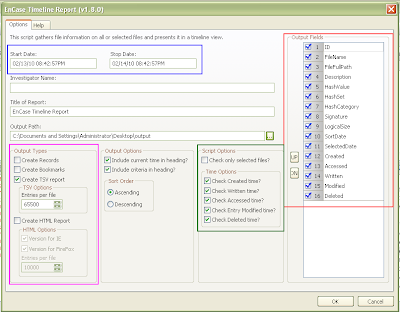
You can pick a certain time period with a start and stop date for the timeline (boxed in blue). You can pick the type of output you want (boxed in pink), whether you want Records, Bookmarks, a Tab Delimited report (TSV), how many entries you'd like in each TSV file and whether or not you would like an HTML report better suited for IE or Firefox. There are more Script Options and Time Options (boxed in green) that allow you to select files you want in the timeline report (default is all files) and which time entries you are interested in seeing (default is all). You can modify the order to the Output Fields (boxed in red) for the TSV file or remove fields that are not of interest. Other fields are self explanatory.
While the script is running you can see the progress bar at the bottom right. If you choose the HTML report option you may end up with several HTML files (depending on how many files are selected and how many entries per file you have selected) and if this is the case each file is named in order for example:
TimelineReport-FF.html
TimelineReport-FF2.html
TimelineReport-FF3.html
and so on... You can see an example report below:

The latest change is highlighted, but you can see that some files might have the same time stamp for different fields. In this case the file will be listed twice, once with Created highlighted and once with Accessed highlighted (from the README).
You can check out some of Geoff's other EnScripts and CEIC presentations at his website: http://www.geoffblack.com/forensics.
The contents of the zip are as follows:
Timeline Report.EnPack
Timeline Report.EnScript (actual code)
Timeline_Report_README.pdf
Timeline_Report_WHATSNEW.pdf
Include\GNB_HTMLlib.EnScript (library file)
Include\GNB_XMLlib.EnScript (library file)
I must say that it's nice that Geoff has given us the code to his Timeline script so that one can modify as desired. It's also nice that he includes README and WHATSNEW files so you can have something to reference for past and present versions.
Simply unzip these items (without the pdfs) into your EnCaseX\EnScript folder and you are ready to go. You can run the script by either double clicking the EnPack or the EnScript, just make sure to add a disk image to the case first ;-). When you run it you will see the following:

There are a lot of options you can choose. Here's a closeup of the interface itself:

You can pick a certain time period with a start and stop date for the timeline (boxed in blue). You can pick the type of output you want (boxed in pink), whether you want Records, Bookmarks, a Tab Delimited report (TSV), how many entries you'd like in each TSV file and whether or not you would like an HTML report better suited for IE or Firefox. There are more Script Options and Time Options (boxed in green) that allow you to select files you want in the timeline report (default is all files) and which time entries you are interested in seeing (default is all). You can modify the order to the Output Fields (boxed in red) for the TSV file or remove fields that are not of interest. Other fields are self explanatory.
While the script is running you can see the progress bar at the bottom right. If you choose the HTML report option you may end up with several HTML files (depending on how many files are selected and how many entries per file you have selected) and if this is the case each file is named in order for example:
TimelineReport-FF.html
TimelineReport-FF2.html
TimelineReport-FF3.html
and so on... You can see an example report below:

The latest change is highlighted, but you can see that some files might have the same time stamp for different fields. In this case the file will be listed twice, once with Created highlighted and once with Accessed highlighted (from the README).
You can check out some of Geoff's other EnScripts and CEIC presentations at his website: http://www.geoffblack.com/forensics.
Yahoo Messenger EnScripts
There are a couple of publicly available Yahoo Messenger EnScripts/EnPacks out, such as:
Yahoo Decoder in unallocated by Lance Mueller
YahooMessenger-Parser by Paul Bobby
Pretty useful scripts, however they don't handle right-to-left languages like Hebrew and Arabic. Here are some before pics from my test run with Hebrew:
Lance Mueller's script's output:

Paul Bobby's scripts' output:

As you can see, (well if you know what Hebrew letters are supposed to look like) the letters come out as some gobbeldy-gook. This is something I've been meaning to comment on for a while, having written various chat EnScripts at the beginning of my GSI employment. I have just gotten around to it now... The "encryption" method is the same for all unicode languages in that it is a byte-by-byte xor with the local username. The problem is that the encoding becomes distorted when it is just saved in a string. For example the letters ש and ל with UTF-8 encodings d7a9 and d79c respectively become c397 and c2a9 (it is left as an exercise for the reader to figure out why). So here comes a solution that I have used in the past.
The EnScripting language has a class called MemoryFileClass, which allows you to have in memory buffers that you can treat as files. You can create them, open them, read and write to them as you would any other file. So the idea is simple enough: write to a memory buffer as you decrypt the message and then extract the message after all decryption has taken place. This is accomplished by adding a couple of helper functions to Paul Bobby's code:
Now we can just call the functions as appropriate when decrypting and outputting the messages. You can see the correct output after this modification below (yeah, the conversation is lame and is just a test ;-):

The complete modified EnScript is available on the GSI forum (registration required):
A thread on the GSI forum with Paul Bobby's fixed EnScript
Yahoo Decoder in unallocated by Lance Mueller
YahooMessenger-Parser by Paul Bobby
Pretty useful scripts, however they don't handle right-to-left languages like Hebrew and Arabic. Here are some before pics from my test run with Hebrew:
Lance Mueller's script's output:

Paul Bobby's scripts' output:

As you can see, (well if you know what Hebrew letters are supposed to look like) the letters come out as some gobbeldy-gook. This is something I've been meaning to comment on for a while, having written various chat EnScripts at the beginning of my GSI employment. I have just gotten around to it now... The "encryption" method is the same for all unicode languages in that it is a byte-by-byte xor with the local username. The problem is that the encoding becomes distorted when it is just saved in a string. For example the letters ש and ל with UTF-8 encodings d7a9 and d79c respectively become c397 and c2a9 (it is left as an exercise for the reader to figure out why). So here comes a solution that I have used in the past.
The EnScripting language has a class called MemoryFileClass, which allows you to have in memory buffers that you can treat as files. You can create them, open them, read and write to them as you would any other file. So the idea is simple enough: write to a memory buffer as you decrypt the message and then extract the message after all decryption has taken place. This is accomplished by adding a couple of helper functions to Paul Bobby's code:
bool WriteBuffer(MemoryFileClass &file, char msg) {
  file.SetCodePage(CodePageClass::ANSI);
  int temp = msg;
  file.WriteBinaryInt(temp, 1);
  return file.IsValid();
}

void ReadBuffer(MemoryFileClass &file, String &msg) {
  file.SetCodePage(CodePageClass::UTF8);
  file.Seek(0);
  file.ReadString(msg);
}
Now we can just call the functions as appropriate when decrypting and outputting the messages. You can see the correct output after this modification below (yeah, the conversation is lame and is just a test ;-):

The complete modified EnScript is available on the GSI forum (registration required):
A thread on the GSI forum with Paul Bobby's fixed EnScript
Sunday, February 07, 2010
Briefly: Memory Analysis EnScripts
I came across a post for the Memory Forensic Toolkit EnScript in the GSI Forum a few days ago. I finally got a chance to play around with it a little today and this will be a very brief overview.
Prerequisite: EnCase 6.14 or higher.
Simply download the toolkit from the link above and unzip it into your EnCaseX.X.X\EnScripts folder. You should see something like the following in your EnScript pane with a Windows 7 folder and Windows XP:
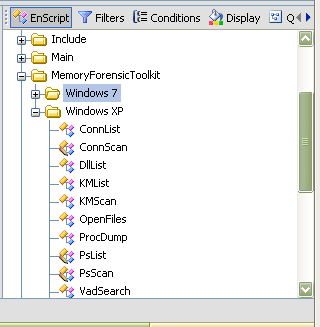
I have only tested the XP scripts at this time. EnScripts available:
- PsList: List of all processes
- KMList: Show all loaded kernel modules
- ConnList: View all TCP connections
- VadSearch: VAD process in the search for a string
- DllList: List Dlls
- OpenFiles: List of open files that the process
- ProcDump: Extracting of a process to exe format
- PsScan: Enumerates process information (EPROCESS)
- ConnScan: Enumerates TCP connection information (TCPT_OBJECT)
- KMScan: Enumerates kernel modules (LDR_MODULE)
- Vtypes/Win32/x86: library to use the above scripts
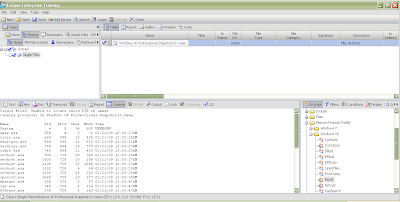
You can run these EnScripts on raw memory dumps, just make sure to check the blue box for the memory dump you would like to run the EnScript against. Just double click the script you'd like to run.
Here's an example run of PsList:
And ConnScan:
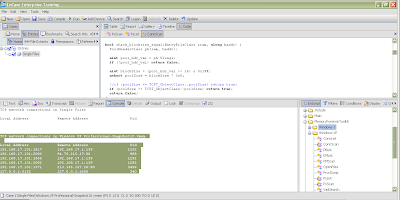
The output is very similar to Volatility and goes to the console by default. You can easily modify the script to output to a text file, Excel spreadsheet or any other output type you can think about, however.
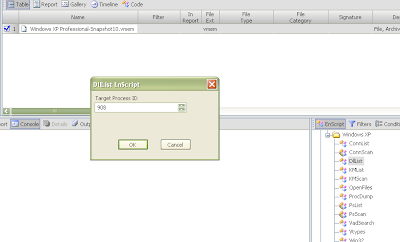
For some EnScripts like dlllist, you are prompted for a PID to run it against. You can modify the script to run agains all PIDs however, if desired.
There is also a Microsoft Crash Analyzer which I have yet to try.
Prerequisite: EnCase 6.14 or higher.
Simply download the toolkit from the link above and unzip it into your EnCaseX.X.X\EnScripts folder. You should see something like the following in your EnScript pane with a Windows 7 folder and Windows XP:

I have only tested the XP scripts at this time. EnScripts available:
- PsList: List of all processes
- KMList: Show all loaded kernel modules
- ConnList: View all TCP connections
- VadSearch: VAD process in the search for a string
- DllList: List Dlls
- OpenFiles: List of open files that the process
- ProcDump: Extracting of a process to exe format
- PsScan: Enumerates process information (EPROCESS)
- ConnScan: Enumerates TCP connection information (TCPT_OBJECT)
- KMScan: Enumerates kernel modules (LDR_MODULE)
- Vtypes/Win32/x86: library to use the above scripts
You can run these EnScripts on raw memory dumps, just make sure to check the blue box for the memory dump you would like to run the EnScript against. Just double click the script you'd like to run.
Here's an example run of PsList:

And ConnScan:

The output is very similar to Volatility and goes to the console by default. You can easily modify the script to output to a text file, Excel spreadsheet or any other output type you can think about, however.
For some EnScripts like dlllist, you are prompted for a PID to run it against. You can modify the script to run agains all PIDs however, if desired.

There is also a Microsoft Crash Analyzer which I have yet to try.
Subscribe to:
Posts (Atom)