I'd like to thank everyone for coming to my talks at Enfuse 2016. As promised, here are the materials for the course. I ask that you don't redistribute the materials elsewhere. You must use the password given to you in class, and the link will expire in 30 days:
https://www.dropbox.com/sh/j5svwjm7kse28i3/AACBTcZQYPgikxYPx_c3E7Apa?dl=0
For those who were asking about other available memory samples, we have several available on the Volatility Wiki. We also have memory samples available from our training website, as well as a lab guide and answer sheet for those of you who asked about using memory samples for your college course materials.
As always, feel free to send me an email if you have any Volatility issues or questions.
Showing posts with label memory. Show all posts
Showing posts with label memory. Show all posts
Wednesday, May 25, 2016

Monday, May 18, 2015
Linux Memory Forensics: Using mprotect() with PROT_NONE
In case you didn't catch it on the Volatility Labs blog, I found an interesting bug that we've had in the framework since we've had Linux support. If you've had cases that involved Linux samples and plugins like linux_yarascan, linux_strings etc, you might want to update to the latest code and have another look over those samples. Of course, there's no reason to think that a piece of malware might have used this trick and used a sigsegv handler to access the data, but the idea has been around for years...
Monday, April 14, 2014
Volatility Talk at Upcoming NYC4SEC
The Volatility team will give a talk at the next NYC4SEC meetup on memory forensics on May 8th, 2014 at John Jay College. Make sure to RSVP if you are planning to attend, since there is limited seating!
Thanks For the Memory: Rootkits, Exfil and APT - RAM Conquers All
The ability to perform digital investigations and incident response is becoming a critical skill for many occupations. Unfortunately, digital investigators frequently lack the training or experience to take advantage of the volatile artifacts found in physical memory. Volatile memory contains valuable information about the runtime state of the system, provides the ability to link artifacts from traditional forensic analysis (network, file system, registry), and provides the ability to ascertain investigative leads that have been unbeknownst to most analysts. Malicious adversaries have been leveraging this knowledge disparity to undermine many aspects of the digital investigation process with such things as anti-forensics techniques, memory resident malware, kernel rootkits, encryption (file systems, network traffic, etc), and Trojan defenses. The only way to turn-the-tables and defeat a creative digital human adversary is through talented analysts.
This talk demonstrates the importance of including Volatile memory in your investigations with an overview of the most widely used memory forensics tool, Volatility, by its developers.
-@gleeda
Thanks For the Memory: Rootkits, Exfil and APT - RAM Conquers All
The ability to perform digital investigations and incident response is becoming a critical skill for many occupations. Unfortunately, digital investigators frequently lack the training or experience to take advantage of the volatile artifacts found in physical memory. Volatile memory contains valuable information about the runtime state of the system, provides the ability to link artifacts from traditional forensic analysis (network, file system, registry), and provides the ability to ascertain investigative leads that have been unbeknownst to most analysts. Malicious adversaries have been leveraging this knowledge disparity to undermine many aspects of the digital investigation process with such things as anti-forensics techniques, memory resident malware, kernel rootkits, encryption (file systems, network traffic, etc), and Trojan defenses. The only way to turn-the-tables and defeat a creative digital human adversary is through talented analysts.
This talk demonstrates the importance of including Volatile memory in your investigations with an overview of the most widely used memory forensics tool, Volatility, by its developers.
-@gleeda
Friday, February 07, 2014
New Volatility Training Website
We have a new website for all of our Volatility training opportunities. Don't forget to check it out: http://www.memoryanalysis.net/
- @gleeda
- @gleeda
Tuesday, July 16, 2013
Volatility News
Things have been busy lately, but I want to let you know about some important items that are coming up quickly:
Andrew Case and I will teach our course in Digital Forensics and Incident Response again this summer at Black Hat Vegas. This course will cover enough material to take someone from knowing practically nothing about digital forensics (disk and memory) to a point where s/he can comfortably conduct his/her own investigations. There is limited time to sign up, so reserve your seat while you can!
You can hear Andrew talk about Digital Forensics and Incident Response on the Healthy Paranoia podcast from July 7th, 2013.
The 1st Annual Volatility Plugin Contest deadline is quickly approaching! Don't miss this opportunity to win over $2000 in cash and prizes and contribute to the top memory forensics framework by writing a plugin for the Volatility Framework and submitting it to volcon2013@memoryanalysis.net by August 1st, 2013.
We will have our 4th public offering of our official Windows Malware and Memory Forensics training in the Netherlands September 9-13, 2013. This will be our only offering outside the US for this year. Past offerings of our course have been well received and were recently described as the "... perfect combination of incident response, malware analysis and Windows internals." Don't miss out on your chance to take this course and learn not only how to become a Volatility superuser, but how to apply cutting edge memory and malware analysis methodologies against your worst adversary.
The Open Memory Forensics Workshop (OMFW) call for papers has been announced. If you want to give a talk on memory forensics related topics, please get your submission in by September 1st, 2013. OMFW is a half-day workshop that will be held one day prior to the Open Source Digital Forensics Conference in Chantilly, VA. This workshop is fast-paced, to the point, highly technical and intended to raise the bar for analysts who realize the importance of memory forensics when faced with a highly skilled adversary. Not only will you learn a lot and get to meet all the movers and shakers in the space, but your $50 registration fee is entirely donated to charity! Last year all proceeds went to the National Center for Missing and Exploited Children. So don't delay: there really is limited seating and it does go quickly. Make sure to register your seat now!
The Volatility team will be at the Open Source Digital Forensics Conference discussing The State of Volatility. Come by and see us there :-)
We will have our 5th public offering of the official Windows Malware and Memory Forensics training in Reston, VA November 11-15th, 2013. If you missed the last offering in June, this is your chance to take this course and learn from the developers themselves. As I've stated before, this class includes real-world scenarios that are reinforced with hands-on labs. We cover more than "just one tool" as some detractors like to say. We cover methodologies that will actually help you where some tools fail. You will have a deep enough understanding to investigate even the most skilled adversaries who know how to break common tools in order to hide. Don't be fooled and don't be left behind. Accept no imitations and make sure to take this class.
All students who take the official Volatility training receive a certificate of completion, with CPE credits that can be used for certification renewal. In addition to this, we are constantly updating the course with new material and past students are given updated materials for FREE. What more can you ask for? If you are interested in Volatility training, drop us a line at voltraining [[ at ]] memoryanalysis.net
If you want to see co-trainers MHL and Andrew Case (attrc) in action, I managed to find a couple of videos of their previous talks on youtube:
July 27-30th, 2013: Blackhat Vegas
Andrew Case and I will teach our course in Digital Forensics and Incident Response again this summer at Black Hat Vegas. This course will cover enough material to take someone from knowing practically nothing about digital forensics (disk and memory) to a point where s/he can comfortably conduct his/her own investigations. There is limited time to sign up, so reserve your seat while you can!
You can hear Andrew talk about Digital Forensics and Incident Response on the Healthy Paranoia podcast from July 7th, 2013.
August 1st, 2013: Volatility Plugin Contest
The 1st Annual Volatility Plugin Contest deadline is quickly approaching! Don't miss this opportunity to win over $2000 in cash and prizes and contribute to the top memory forensics framework by writing a plugin for the Volatility Framework and submitting it to volcon2013@memoryanalysis.net by August 1st, 2013.
September 9-13th, 2013: Volatility Training in the Netherlands
We will have our 4th public offering of our official Windows Malware and Memory Forensics training in the Netherlands September 9-13, 2013. This will be our only offering outside the US for this year. Past offerings of our course have been well received and were recently described as the "... perfect combination of incident response, malware analysis and Windows internals." Don't miss out on your chance to take this course and learn not only how to become a Volatility superuser, but how to apply cutting edge memory and malware analysis methodologies against your worst adversary.
November 4th, 2013: Open Memory Forensics Workshop (OMFW)
The Open Memory Forensics Workshop (OMFW) call for papers has been announced. If you want to give a talk on memory forensics related topics, please get your submission in by September 1st, 2013. OMFW is a half-day workshop that will be held one day prior to the Open Source Digital Forensics Conference in Chantilly, VA. This workshop is fast-paced, to the point, highly technical and intended to raise the bar for analysts who realize the importance of memory forensics when faced with a highly skilled adversary. Not only will you learn a lot and get to meet all the movers and shakers in the space, but your $50 registration fee is entirely donated to charity! Last year all proceeds went to the National Center for Missing and Exploited Children. So don't delay: there really is limited seating and it does go quickly. Make sure to register your seat now!
November 5th, 2013: Open Source Digital Forensics Conference
The Volatility team will be at the Open Source Digital Forensics Conference discussing The State of Volatility. Come by and see us there :-)
November 11-15th, 2013: Volatility Training in Reston, VA
We will have our 5th public offering of the official Windows Malware and Memory Forensics training in Reston, VA November 11-15th, 2013. If you missed the last offering in June, this is your chance to take this course and learn from the developers themselves. As I've stated before, this class includes real-world scenarios that are reinforced with hands-on labs. We cover more than "just one tool" as some detractors like to say. We cover methodologies that will actually help you where some tools fail. You will have a deep enough understanding to investigate even the most skilled adversaries who know how to break common tools in order to hide. Don't be fooled and don't be left behind. Accept no imitations and make sure to take this class.
All students who take the official Volatility training receive a certificate of completion, with CPE credits that can be used for certification renewal. In addition to this, we are constantly updating the course with new material and past students are given updated materials for FREE. What more can you ask for? If you are interested in Volatility training, drop us a line at voltraining [[ at ]] memoryanalysis.net
If you want to see co-trainers MHL and Andrew Case (attrc) in action, I managed to find a couple of videos of their previous talks on youtube:
Friday, April 19, 2013
Upcoming Events and Trainings
I have several speaking and training events that are coming up this year that may be of interest to others in the community:
I will be speaking at the New York Banker's Association's upcoming Annual Technology, Compliance & Risk Management Forum on May 16th, 2013 on the topic of Incident Response and Digital Forensics. If you plan to attend I'll see you there!
Also we (Volatility) are holding our third run of Windows Malware and Memory Forensics in Reston, VA from Monday June 10th through Friday, June 14th 2013. This training will not disappoint even the most proficient of forensic/malware analysts. It includes real-world scenarios that are reinforced with hands-on labs. All students will leave with skills and confidence to conduct investigations involving RAM samples from acquisition to the final report. Students also leave with more than just being Volatility power users, they leave with a deeper knowledge of memory forensics and malware analysis methodologies. Such knowledge is integral regardless of what tools you choose for future investigations, be they open source or commercial, and much more powerful than simply "run this tool, the output is colored red so it's bad". You'll leave the class with knowledge that will help you to figure out if something really is "bad" or not. There are still a few seats left for this training, so if you are interested you should register soon. Send an email to voltraining [at] memoryanalysis.net for registration information.
If you are looking for a course that covers both disk and memory forensics, Andrew Case and I will teach our course in Digital Forensics and Incident Response again this summer at Black Hat Vegas. This course runs from July 27th through July 30th 2013 and will cover enough material to take someone from knowing practically nothing about digital forensics to a point where s/he can comfortably conduct his/her own investigations.
Also we (Volatility) will hold another run of Windows Malware and Memory Forensics in the Netherlands from Monday September 9th through Friday, September 13th 2013. Details will appear soon on the Volatility Labs blog.
Planning for the Open Memory Forensics Workshop (OMFW) is in progress. You should plan to attend if you want to know what's new and hot in the memory forensics space. OMFW is likely to take place on November 4th, 2013 one day prior to the Sleuth Kit and Open Source Digital Forensics Conference. Final details will appear soon on the Volatility Labs blog.
I will be speaking at the New York Banker's Association's upcoming Annual Technology, Compliance & Risk Management Forum on May 16th, 2013 on the topic of Incident Response and Digital Forensics. If you plan to attend I'll see you there!
Also we (Volatility) are holding our third run of Windows Malware and Memory Forensics in Reston, VA from Monday June 10th through Friday, June 14th 2013. This training will not disappoint even the most proficient of forensic/malware analysts. It includes real-world scenarios that are reinforced with hands-on labs. All students will leave with skills and confidence to conduct investigations involving RAM samples from acquisition to the final report. Students also leave with more than just being Volatility power users, they leave with a deeper knowledge of memory forensics and malware analysis methodologies. Such knowledge is integral regardless of what tools you choose for future investigations, be they open source or commercial, and much more powerful than simply "run this tool, the output is colored red so it's bad". You'll leave the class with knowledge that will help you to figure out if something really is "bad" or not. There are still a few seats left for this training, so if you are interested you should register soon. Send an email to voltraining [at] memoryanalysis.net for registration information.
If you are looking for a course that covers both disk and memory forensics, Andrew Case and I will teach our course in Digital Forensics and Incident Response again this summer at Black Hat Vegas. This course runs from July 27th through July 30th 2013 and will cover enough material to take someone from knowing practically nothing about digital forensics to a point where s/he can comfortably conduct his/her own investigations.
Also we (Volatility) will hold another run of Windows Malware and Memory Forensics in the Netherlands from Monday September 9th through Friday, September 13th 2013. Details will appear soon on the Volatility Labs blog.
Planning for the Open Memory Forensics Workshop (OMFW) is in progress. You should plan to attend if you want to know what's new and hot in the memory forensics space. OMFW is likely to take place on November 4th, 2013 one day prior to the Sleuth Kit and Open Source Digital Forensics Conference. Final details will appear soon on the Volatility Labs blog.
Monday, January 14, 2013
Windows Malware and Memory Forensics Training in The Windy City!
Cross posted from the Volatility Labs Blog:
The next journey to the center of Windows Memory Forensics starts in Chicago this March!
We are pleased to announce the second public offering of the Windows Malware and Memory Forensics Training by The Volatility Project. This is the only memory forensics course officially designed, sponsored, and taught by the Volatility developers. One of the main reasons we made Volatility open-source is to encourage and facilitate a deeper understanding of how memory analysis works, where the evidence originates, and how to interpret the data collected by the framework's extensive set of plugins. Now you can learn about these benefits first hand from the developers of the most powerful, flexible, and innovative memory forensics tool.
Appraisal from your peers who attended the first course this past December:
Please see the following details about the upcoming training event:
Dates: Monday, March 18th through Friday, March 22nd 2013
Location: Downtown Chicago, IL (exact location will be shared upon registration)
Instructors: Michael Ligh (@iMHLv2), Andrew Case (@attrc), Jamie Levy (@gleeda)
For more information about the course, view the Volatility Training Flyer (to download a copy of the PDF, click File > Download). To request a link to the online registration site or to receive a detailed course agenda/outline, please send an email voltraining [at] memoryanalysis.net.

The 1st Annual Volatility Framework Plugin Contest
Cross posted from the Volatility Labs Blog:
We are pleased to announce the 1st Annual Volatility Plugin Contest. This contest is inspired and modeled after the Hex-Rays Plugin Contest. As in the case of IDA, Volatility was designed with the belief that talented analysts should only be limited by their creativity not the tools they use. In this spirit, Volatility has a flexible architecture that can be extended in numerous ways: analysis plugins (operating system plugins, application plugins, etc), volshell commands, address spaces, profiles, or user interfaces. This contest is intended to inspire people to demonstrate their creativity, become a memory analysis pioneer, win the admiration of your peers, and give back to the community.
The contest is straightforward: Create an innovative and useful extension to The Volatility Framework and win the contest!
- 1st place wins one free seat at any future Windows Malware and Memory Forensics Training *or* 1500 USD cash
- 2nd place wins 500 USD cash
- 3rd place wins 250 USD cash
- 4th and 5th place wins Volatility swag (T-shirts, Stickers, etc)
Everyone but the Volatility core developers can participate.
Rules of Engagement
- The goal of the contest is to create innovative, interesting, and useful extensions for The Volatility Framework. While extensions written in Python are preferred, extensions written in other languages will also be considered.
- The submitted extensions should work with the Volatility 2.2 (or greater) release and should have been implemented after the initial contest announcement (1/14/2013).
- The top 5 winners of the contest will get the prizes mentioned above.
- Volatility core developers are not eligible.
- Submissions should be sent to volcon2013@memoryanalysis.net. The submission should include the source code, a short description of how the extension is used, and a signed "Individual Contributor License Agreement".
- By submitting an entry, you declare that you own the copyright to the source code and are authorized to submit it.
- All submissions should be received no later than August 1, 2013. The winner will be announced the following week. We recommend submitting early. In the case of similar submissions, preference will be shown to early submissions.
- The Volatility Project core developers will decide the winners based on the following criteria: creativity, usefulness, effort, completeness, submission date, and clarity of documentation.
- In order to collect the cash prizes, the winner will need to provide a legal picture identification and bank account information within 30 days of notification. The bank transfer will be made within two weeks after the winner is authenticated.
- Group entries are allowed; the prize will be paid (or seat will be registered, if the training option is desired) to the person designated by the group.
- Upon approval from the winners, their names/aliases will be listed on the "Volatility Hall of Fame" web page for the world to admire.
- Selected contestants may also be asked to present their work at the 2013 Open Memory Forensics Workshop or have their research featured on the Volatility Labs Blog.
Acknowledgements
A special thanks goes out to the Hex-Rays team for providing the inspiration and template for this contest.
Saturday, September 29, 2012
Week 3 of the Month of Volatility Plugins posted!
Cross listed from Andrew Case's blog:
I was writing to announce that week 3 of the month of Volatility plugins is finished, and we now have five more in-depth blog posts covering Windows and Linux internals and rootkit detection as well as a bonus plugin that analyzes Internet Explorer browsing history. These have all been posted on the Volatility Labs blog.
Post 1: Detecting Malware Hooks in the Windows GUI Subsystem
This Windows focused post covers detecting malware hooks in the Windows GUI subsystem, including message hooks and event hooks, and what effects these hooks can have on a compromised system.
http://volatility-labs.blogspot.com/2012/09/movp-31-detecting-malware-hooks-in.html
Post 2: Shellbags in Memory, SetRegTime, and TrueCrypt Volumes
This Windows focused post covers finding and recovering shellbags from memory, the forensics importance of shellbags, and analyzes the effects of anti-forensics on shellbag timestamps. It concludes with covering the traces left in shellbags by TrueCrypt.
http://volatility-labs.blogspot.com/2012/09/movp-32-shellbags-in-memory-setregtime.html
Post 3: Analyzing USER Handles and the Win32k.sys Gahti
This Windows focused post introduces two new plugins, one named gahti that determines the various different types of USER objects on a system and another named userhandles which traverses the handle table entries and associates them with the owning processes or threads
http://volatility-labs.blogspot.com/2012/09/movp-33-analyzing-user-handles-and.html
Post 4: Recovering tagCLIPDATA: What's In Your Clipboard?
This Windows focused post covers recovery of the Windows clipboard from physical memory.
http://volatility-labs.blogspot.com/2012/09/movp-34-recovering-tagclipdata-whats-in.html
Post 5: Analyzing the 2008 DFRWS Challenge with Volatility
This Linux focused post analyzes the 2008 memory challenge with Volatility. It walks through the artifacts produced by the winning team and shows how to recover the same information with Volatility. It then shows plugins in Volatility that can recover artifacts not produced by the winning team.
http://volatility-labs.blogspot.com/2012/09/movp-35-analyzing-2008-dfrws-challenge.html
Bonus Post: HowTo: Scan for Internet Cache/History and URLs
This Windows focused post covers how to recover Internet Explorer's cache and history from a memory sample.
http://volatility-labs.blogspot.com/2012/09/howto-scan-for-internet-cachehistory.html
If you have any questions or comments on the posts, please leave a comment on the respective post on the Volatility Labs blog.
Friday, September 21, 2012
Week 2 of the Month of Volatility Plugins posted!
It's been an exciting week in the Volatility community. We've just finished our second week of Month of Volatility Plugins (MoVP) blogposts, released Volatility 2.2 RC2 for testing, fixed a few minor bugs and now we're gearing up for our third week of posts and the upcoming Open Memory Forensics Workshop (OMFW). Here is a list of this week's posts, compiled by Andrew Case:
We hope you've enjoyed this week's series. Stay tuned, we have much more in store!
I was writing to announce that week 2 of the month of Volatility plugins is finished, and we now have five more in-depth blog posts covering Windows and Linux internals and rootkit detection. These have all been posted to the new Volatility Labs blog.
Post 1: Atoms (The New Mutex), Classes and DLL Injection
This Windows focused post covers investigating malware and understanding infections by analyzing the atom tables.
http://volatility-labs.blogspot.com/2012/09/movp-21-atoms-new-mutex-classes-and-dll.html
Post 2: Malware in your Windows
This Windows focused post covers enumerating and analyzing windows in the GUI subsystem.
http://volatility-labs.blogspot.com/2012/09/movp-22-malware-in-your-windows.html
Post 3: Event logs and Service SIDs
This Windows focused post demonstrates recovering event logs from memory and calculating service SIDs.
http://volatility-labs.blogspot.com/2012/09/movp-23-event-logs-and-service-sids.html
Post 4: Analyzing the Jynx rootkit and LD_PRELOAD
This Linux focused post covers analyzing the Jynx rootkit as well as generic methods for analyzing LD_PRELOAD based rootkits.
http://volatility-labs.blogspot.com/2012/09/movp-24-analyzing-jynx-rootkit-and.html
Post 5: Investigating In-Memory Network Data with Volatility
This Linux focused post goes through each of the Linux Volatility plugins related to recovering network data from memory, such as network connections, packets, and the routing cache.
http://volatility-labs.blogspot.com/2012/09/movp-25-investigating-in-memory-network.html
If you have any questions or comments on the posts, please leave a comment on the respective post on the Volatility Labs blog.
We hope you've enjoyed this week's series. Stay tuned, we have much more in store!
Friday, September 14, 2012
Week 1 of the Month of Volatility Plugins posted!
I'm going to borrow from Andrew's blog here to let you know about our Month of Volatility Plugins:
Future Volatility posts will appear on our official blog (http://volatility-labs.blogspot.com/). Also you might want to follow our project on twitter: @Volatility for updates and news. See you at OMFW!
I was writing to announce that week 1 of the month of Volatility plugins is finished, and we now have five in-depth blog posts covering Windows and Linux internals and rootkit detection. These have all been posted to the new Volatility Labs blog.
Post 1: Logon Sessions, Processes, and Images
This Windows focused post covers linking processes to their logon session, detecting hidden processes using session structures, and determining the loaded the drivers mapped into each session.
http://volatility-labs.blogspot.com/2012/09/movp-11- logon-sessions-processes-and. html
Post 2: Window Stations and Clipboard Malware
This Windows focused post covers enumerating and analyzing window stations and clipboard monitoring malware.
http://volatility-labs.blogspot.com/2012/09/movp-12- window-stations-and-clipboard. html
Post 3: Desktops, Heaps, and Ransomware
This Windows focused post covers finding rogue desktops used to hide applications and created by ransomware, linking threads to desktops, analyzing the desktop heap for memory corruptions, and profiling heap allocations to locate USER objects.
http://volatility-labs.blogspot.com/2012/09/movp-13- desktops-heaps-and-ransomware. html
Post 4: Average Coder Rootkit, Bash History, and Elevated Processes
This Linux focused post covers analyzing the Average Coder rootkit, recovering .bash_history from memory, even when faced with anti-forensics, and finding elevated processes.
http://volatility-labs.blogspot.com/2012/09/movp-14- average-coder-rootkit-bash. html
Post 5: KBeast Rootkit, Detecting Hidden Modules, and sysfs
This Linux focused post covers analyzing the KBeast rootkit, finding modules unlinked from the module list, and the forensic values of sysfs.
http://volatility-labs.blogspot.com/2012/09/movp-15- kbeast-rootkit-detecting- hidden.html
If you have any questions or comments on the posts, please leave a comment on the respective post on the Volatility Labs blog.
Future Volatility posts will appear on our official blog (http://volatility-labs.blogspot.com/). Also you might want to follow our project on twitter: @Volatility for updates and news. See you at OMFW!
Tuesday, September 13, 2011
Volatility 2.0: Timeliner, RegistryAPI, evtlogs and more
Back in July I gave a talk at OMFW about extracting timeline data from a memory sample using the Volatility framework. Now has come the time to release the plugins that came along with that talk.
In addition to the plugins I have included a whitepaper on how these plugins were created and used. It is released more in hopes that people will see how to use the framework and be able to write their own plugins or extend existing ones.
I have included all these plugins in a zip file:
MHL's malware malware plugins (malware.py) are included only for convenience. You can also download them from his repository and check there for updates.
I would like to thank MHL and AW for their valuable feedback and Bertha M for extensive testing of the timeliner plugins. The links to the paper and plugins are below:
Timeliner Release Documentation (PDF)
timeliner plugins (ZIP)
Note: Any updates to these plugins will appear in my github repository first.
In addition to the plugins I have included a whitepaper on how these plugins were created and used. It is released more in hopes that people will see how to use the framework and be able to write their own plugins or extend existing ones.
I have included all these plugins in a zip file:
$ unzip -l timeliner_9-2011.zip
Archive:  timeliner_9-2011.zip
  Length     Date   Time    Name
 --------    ----   ----    ----
    14455  09-28-11 14:40   volatility/plugins/timeliner.py
    10789  09-27-11 09:24   volatility/plugins/evtlogs.py
   147458  09-09-11 11:03   volatility/plugins/malware.py
    13559  09-22-11 19:09   volatility/plugins/registryapi.py
     8554  09-18-11 21:33   volatility/plugins/getsids.py
    40993  09-22-11 16:29   volatility/plugins/getservicesids.py
 --------                   -------
   235808                   6 files
- evtlogs.py: plugin to parse Evt logs from XP/2K3
- registryapi.py: plugin for routine registry actions
- getservicesids.py: plugin to collect and calculate service SIDs (used with the new getsids and evtlogs
- timeliner.py: the timeline creating script that pulls everything together
MHL's malware malware plugins (malware.py) are included only for convenience. You can also download them from his repository and check there for updates.
I would like to thank MHL and AW for their valuable feedback and Bertha M for extensive testing of the timeliner plugins. The links to the paper and plugins are below:
Timeliner Release Documentation (PDF)
timeliner plugins (ZIP)
Note: Any updates to these plugins will appear in my github repository first.
Saturday, April 30, 2011
Volatility 1.4 UserAssist plugin
From a computer forensics standpoint, userassist keys can provide a lot of information about user activity (see the Harlan's posts for more information).
After looking at Didier Steven's article on userassist keys for Windows 7 from Into the Boxes issue 0x0 and RegRipper, I decided to write up a plugin that would pull out UserAssist keys from all versions of windows for Volatility.
One thing I decided to add was an enumeration of GUIDs to human friendly folder names, which were obtained from here.
The plugin is available in my git repository. Simply download and place into your volatility/plugins directory and you're set.
Update: This plugin is now part of the core Volatility code
Example Output
Below you can see some snippets of output for Windows 7. The fields are pretty self explanatory, though you can read Didier Steven's article for more details. The hex dump is the actual data from which this information was parsed, just so you can verify it yourself.
Here you can see an example of output from Windows XP:
Shoutz to ikelos for helping me optimize this :-)
References:
Into the Boxes issue 0x0 http://intotheboxes.wordpress.com/2010/01/01/into-the-boxes-issue-0x0/
RegRipper http://regripper.wordpress.com/
After looking at Didier Steven's article on userassist keys for Windows 7 from Into the Boxes issue 0x0 and RegRipper, I decided to write up a plugin that would pull out UserAssist keys from all versions of windows for Volatility.
One thing I decided to add was an enumeration of GUIDs to human friendly folder names, which were obtained from here.
The plugin is available in my git repository. Simply download and place into your volatility/plugins directory and you're set.
Update: This plugin is now part of the core Volatility code
Example Output
Below you can see some snippets of output for Windows 7. The fields are pretty self explanatory, though you can read Didier Steven's article for more details. The hex dump is the actual data from which this information was parsed, just so you can verify it yourself.
$ ./vol.py -f win7.vmem --profile=Win7SP0x86 userassist --no-cache
Volatile Systems Volatility Framework 1.4_rc1
----------------------------
Registry: \??\C:\Users\admin\ntuser.dat
Key name: Count
Last updated: 2010-07-06 22:40:25

Subkeys:

Values:
REG_BINARY    Microsoft.Windows.GettingStarted :
Count:          14
Focus Count:    21
Time Focused:   0:07:00.500000
Last updated:   2010-03-09 19:49:20

0000   00 00 00 00 0E 00 00 00 15 00 00 00 A0 68 06 00    .............h..
0010   00 00 80 BF 00 00 80 BF 00 00 80 BF 00 00 80 BF    ................
0020   00 00 80 BF 00 00 80 BF 00 00 80 BF 00 00 80 BF    ................
0030   00 00 80 BF 00 00 80 BF FF FF FF FF EC FE 7B 9C    ..............{.
0040   C1 BF CA 01 00 00 00 00                            ........

REG_BINARY    UEME_CTLSESSION :
Count:          187
Focus Count:    1205
Time Focused:   6:25:06.216000
Last updated:   1970-01-01 00:00:00

0000   00 00 00 00 BB 00 00 00 B5 04 00 00 B4 90 60 01    ..............`.
0010   10 00 00 00 39 00 00 00 E9 67 28 00 7B 00 44 00    ....9....g(.{.D.
0020   36 00 35 00 32 00 33 00 31 00 42 00 30 00 2D 00    6.5.2.3.1.B.0.-.
0030   42 00 32 00 46 00 31 00 2D 00 34 00 38 00 35 00    B.2.F.1.-.4.8.5.

[snip]

REG_BINARY    %windir%\system32\displayswitch.exe :
Count:          13
Focus Count:    19
Time Focused:   0:06:20.500000
Last updated:   2010-03-09 19:49:20

0000   00 00 00 00 0D 00 00 00 13 00 00 00 60 CC 05 00    ............`...
0010   00 00 80 BF 00 00 80 BF 00 00 80 BF 00 00 80 BF    ................
0020   00 00 80 BF 00 00 80 BF 00 00 80 BF 00 00 80 BF    ................
0030   00 00 80 BF 00 00 80 BF FF FF FF FF EC FE 7B 9C    ..............{.
0040   C1 BF CA 01 00 00 00 00                            ........

REG_BINARY    %windir%\system32\calc.exe :
Count:          12
Focus Count:    17
Time Focused:   0:05:40.500000
Last updated:   2010-03-09 19:49:20

0000   00 00 00 00 0C 00 00 00 11 00 00 00 20 30 05 00    ............ 0..
0010   00 00 80 BF 00 00 80 BF 00 00 80 BF 00 00 80 BF    ................
0020   00 00 80 BF 00 00 80 BF 00 00 80 BF 00 00 80 BF    ................
0030   00 00 80 BF 00 00 80 BF FF FF FF FF EC FE 7B 9C    ..............{.
0040   C1 BF CA 01 00 00 00 00                            ........
                          ........

REG_BINARY    Z:\vmware-share\apps\odbg110\OLLYDBG.EXE :
Count:          11
Focus Count:    266
Time Focused:   1:19:58.045000
Last updated:   2010-03-18 01:56:31

0000   00 00 00 00 0B 00 00 00 0A 01 00 00 69 34 49 00    ............i4I.
0010   00 00 80 BF 00 00 80 BF 00 00 80 BF 00 00 80 BF    ................
0020   00 00 80 BF 00 00 80 BF 00 00 80 BF 00 00 80 BF    ................
0030   00 00 80 BF 00 00 80 BF FF FF FF FF 70 3B CB 3A    ............p;.:
0040   3E C6 CA 01 00 00 00 00                            >.......

REG_BINARY    %ProgramFiles%\Microsoft SDKs\Windows\v7.0\Bin\vsstools\vshadow.exe :
Count:          0
Focus Count:    67
Time Focused:   0:06:12.811000
Last updated:   1970-01-01 00:00:00

0000   00 00 00 00 00 00 00 00 43 00 00 00 57 AE 05 00    ........C...W...
0010   00 00 80 BF 00 00 80 BF 00 00 80 BF 00 00 80 BF    ................
0020   00 00 80 BF 00 00 80 BF 00 00 80 BF 00 00 80 BF    ................
0030   00 00 80 BF 00 00 80 BF FF FF FF FF 00 00 00 00    ................
0040   00 00 00 00 00 00 00 00                            ........

REG_BINARY    %windir%\regedit.exe :
Count:          2
Focus Count:    8
Time Focused:   0:03:22.626000
Last updated:   2010-03-17 23:40:36

0000   00 00 00 00 02 00 00 00 08 00 00 00 8E 15 03 00    ................
0010   00 00 80 BF 00 00 80 BF 00 00 80 BF 00 00 80 BF    ................
0020   00 00 80 BF 00 00 80 BF 00 00 80 BF 00 00 80 BF    ................
0030   00 00 80 BF 00 00 80 BF FF FF FF FF 90 3A 93 3E    .............:.>
0040   2B C6 CA 01 00 00 00 00                            +.......
Here you can see an example of output from Windows XP:
$ ./vol.py -f XPSP3.vmem --profile=WinXPSP3x86 userassist --no-cache
Volatile Systems Volatility Framework 1.4_rc1
----------------------------
Registry: \Device\HarddiskVolume1\Documents and Settings\Administrator\NTUSER.DAT
Key name: Count
Last updated: 2010-11-24 16:35:34

Subkeys:

Values:
REG_BINARY    UEME_CTLSESSION :
0000   91 52 5B 0E 1F 00 00 00                            .R[.....

REG_BINARY    UEME_CTLCUACount:ctor :
ID:             1
Count:          2
Last updated:   1970-01-01 00:00:00

0000   01 00 00 00 02 00 00 00 00 00 00 00 00 00 00 00    ................

REG_BINARY    UEME_RUNPATH    :
ID:             31
Count:          589
Last updated:   2010-11-24 16:30:49

0000   1F 00 00 00 52 02 00 00 A0 91 09 F4 F4 8B CB 01    ....R...........

REG_BINARY    UEME_RUNPATH:D:\SETUP.EXE :
ID:             30
Count:          6
Last updated:   2010-09-20 15:02:47

0000   1E 00 00 00 0B 00 00 00 E0 85 39 E3 D4 58 CB 01    ..........9..X..

REG_BINARY    UEME_RUNPIDL    :
ID:             31
Count:          124
Last updated:   2010-11-24 14:19:29

0000   1F 00 00 00 81 00 00 00 50 78 79 9B E2 8B CB 01    ........Pxy.....

REG_BINARY    UEME_RUNPIDL:%csidl2%\Microsoft Visual Basic 6.0 :
ID:             1
Count:          2
Last updated:   2009-05-12 02:28:10

0000   01 00 00 00 02 00 00 00 B0 1E DB 4A A9 D2 C9 01    ...........J....

REG_BINARY    UEME_RUNPATH:C:\Program Files\Microsoft Visual Studio\VB98\VB6.EXE :
ID:             1
Count:          1
Last updated:   2009-05-12 02:28:10

0000   01 00 00 00 06 00 00 00 50 62 FC 4A A9 D2 C9 01    ........Pb.J....

REG_BINARY    UEME_RUNPIDL:C:\Documents and Settings\All Users\Start Menu\Windows Update.lnk :
ID:             1
Count:          1
Last updated:   2009-05-12 02:28:36

0000   01 00 00 00 06 00 00 00 F0 D0 A1 5A A9 D2 C9 01    ...........Z....

REG_BINARY    UEME_RUNPATH:C:\WINDOWS\system32\wupdmgr.exe :
ID:             31
Count:          2
Last updated:   2010-11-24 14:50:05
Shoutz to ikelos for helping me optimize this :-)
References:
Into the Boxes issue 0x0 http://intotheboxes.wordpress.com/2010/01/01/into-the-boxes-issue-0x0/
RegRipper http://regripper.wordpress.com/
Wednesday, March 30, 2011
Update: Volatility printkey Plugin
You don't have to use the printkey plugin I released to get bruteforce action. It has been incorporated into the Volatility SVN (thanks to Mike Auty :-)).
So by default you don't have to issue an offset anymore:
And keys from multiple hives will also appear with a separator:
So by default you don't have to issue an offset anymore:
$ python vol.py -f ds_fuzz_hidden_proc.img printkey -K 'ControlSet001\Control\ComputerName\ComputerName'
Volatile Systems Volatility Framework 1.4_rc1
Legend: (S) = Stable (V) = Volatile
----------------------------
Registry: \Device\HarddiskVolume1\WINDOWS\system32\config\system
Key name: ComputerName (S)
Last updated: 2008-10-21 17:48:29
Subkeys:
Values:
REG_SZ ComputerName : (S) GINEVRA
And keys from multiple hives will also appear with a separator:
$ python vol.py -f ds_fuzz_hidden_proc.img printkey -K 'Software\Microsoft\Windows NT\CurrentVersion\Winlogon'
Volatile Systems Volatility Framework 1.4_rc1
Legend: (S) = Stable (V) = Volatile
----------------------------
Registry: \Device\HarddiskVolume1\Documents and Settings\NetworkService\NTUSER.DAT
Key name: Winlogon (S)
Last updated: 2008-11-26 07:38:23
Subkeys:
Values:
REG_SZ ParseAutoexec : (S) 1
REG_SZ ExcludeProfileDirs : (S) Local Settings;Temporary Internet Files;History;Temp
REG_DWORD BuildNumber : (S) 2600
----------------------------
Registry: \Device\HarddiskVolume1\WINDOWS\system32\config\default
Key name: Winlogon (S)
Last updated: 2008-11-26 07:39:40
Subkeys:
Values:
REG_SZ ParseAutoexec : (S) 1
REG_SZ ExcludeProfileDirs : (S) Local Settings;Temporary Internet Files;History;Temp
REG_DWORD BuildNumber : (S) 2600
----------------------------
Registry: \Device\HarddiskVolume1\Documents and Settings\LocalService\NTUSER.DAT
Key name: Winlogon (S)
Last updated: 2008-11-26 07:38:53
Subkeys:
Values:
REG_SZ ParseAutoexec : (S) 1
REG_SZ ExcludeProfileDirs : (S) Local Settings;Temporary Internet Files;History;Temp
REG_DWORD BuildNumber : (S) 2600
----------------------------
Registry: \Device\HarddiskVolume1\Documents and Settings\moyix\NTUSER.DAT
Key name: Winlogon (S)
Last updated: 2008-09-19 20:29:52
Subkeys:
Values:
REG_SZ ParseAutoexec : (S) 1
REG_SZ ExcludeProfileDirs : (S) Local Settings;Temporary Internet Files;History;Temp
REG_DWORD BuildNumber : (S) 2600
Friday, March 25, 2011
Modified Volatility printkey Plugin
As a lot of you already know, Volatility has some pretty cool registry plugins. You can use hivescan to look for registry hives (CMHIVE), hivelist to locate virtual and physical addresses of registry hives and printkey to print out keys for a specified hive, whose virtual address is found from hivelist.
In Volatility 1.3, you had to specify CMHIVE offset (obtained from hivescan) for hivelist in order to get the virtual address for a hive to use with printkey. In Volatility 1.4, hivelist inherits hivescan and obtains the CMHIVE offsets removing one extra step and making it easier for the user.
We still have to provide a virtual address (obtained by hivelist) to printkey in order to print a key from a particular registry. Suppose you don't know which registry contains the key, or you are a little clumsy about which offset you gave printkey, or maybe you want the same key from multiple hives (like all users for example). Well, I know I've personally had some of these issues and I'm sure others have as well ;-)
Recently I modified printkey to include a "brute-force" option to try to obtain a particular key from all hives and thought I'd share this in case anyone else might find it useful. The idea works similar to how hivelist was written to inherit from hivescan; printkey inherits hivelist and can obtain the offsets for all hives if run in brute-force mode. It also retains the previous usage so you can specify an offset.
Let's see some examples. So suppose we want to get the computer name from this image. How do we get that? So normally you have to get a list of registry hives:
From the SYSTEM registry we need this key: ControlSet001\Control\ComputerName\ComputerName We find the virtual offset and specify that in the commandline along with the key:
Nice. Ok, suppose you didn't know you needed to get this information from the SYSTEM registry. You can use the brute-force option (-b):
Hrmmmm.... notice that you get a lot of debug warnings in addition to the correct output for this key. This is because normally you would want to know if the key is not found and as each hive is queried for the key, failed attempts appear in output. However in this case, we know it's not going to be found in all of the registries, so we don't care about these warnings. You could comment out the piece of code in volatility/win32/rawreg.py that gives this warning, or you could use another plugin supplied by Mike Auty called disablewarnings.py This plugin (disablewarnings.py) is located in the "contrib/plugins" folder when you first download Volatility from the Google SVN. In order to use it, you must first move it to your plugins directory. So from the Volatility root folder do the following:
Now we can run the printkey plugin with brute-force option and disable debug statements with two extra switches: -d -W:
Want to see output from multiple hives? Let's look at the Software\Microsoft\Windows NT\CurrentVersion\WinLogon key from user hives:
Notice that the output is also slightly different, since printkey specifies which hive it got the information from (Registry: [Path])
Update: this modification is now in the SVN see here.
In Volatility 1.3, you had to specify CMHIVE offset (obtained from hivescan) for hivelist in order to get the virtual address for a hive to use with printkey. In Volatility 1.4, hivelist inherits hivescan and obtains the CMHIVE offsets removing one extra step and making it easier for the user.
We still have to provide a virtual address (obtained by hivelist) to printkey in order to print a key from a particular registry. Suppose you don't know which registry contains the key, or you are a little clumsy about which offset you gave printkey, or maybe you want the same key from multiple hives (like all users for example). Well, I know I've personally had some of these issues and I'm sure others have as well ;-)
Recently I modified printkey to include a "brute-force" option to try to obtain a particular key from all hives and thought I'd share this in case anyone else might find it useful. The idea works similar to how hivelist was written to inherit from hivescan; printkey inherits hivelist and can obtain the offsets for all hives if run in brute-force mode. It also retains the previous usage so you can specify an offset.
Let's see some examples. So suppose we want to get the computer name from this image. How do we get that? So normally you have to get a list of registry hives:
$ python vol.py -f ds_fuzz_hidden_proc.img hivelist
Volatile Systems Volatility Framework 1.4_rc1
Virtual     Physical    Name
0xe1ada008  0x0b46c008  \Device\HarddiskVolume1\Documents and Settings\moyix\Local Settings\Application Data\Microsoft\Windows\UsrClass.dat
0xe1ad0880  0x0b339880  \Device\HarddiskVolume1\Documents and Settings\moyix\NTUSER.DAT
0xe1ac09e8  0x0b21b9e8  \Device\HarddiskVolume1\Documents and Settings\LocalService\Local Settings\Application Data\Microsoft\Windows\UsrClass.dat
0xe1a9f008  0x0b28b008  \Device\HarddiskVolume1\Documents and Settings\LocalService\NTUSER.DAT
0xe1797a60  0x0951da60  \Device\HarddiskVolume1\Documents and Settings\NetworkService\Local Settings\Application Data\Microsoft\Windows\UsrClass.dat
0xe1790820  0x0960f820  \Device\HarddiskVolume1\Documents and Settings\NetworkService\NTUSER.DAT
0xe1534820  0x032a9820  \Device\HarddiskVolume1\WINDOWS\system32\config\software
0xe1536820  0x032ab820  \Device\HarddiskVolume1\WINDOWS\system32\config\SECURITY
0xe14771f8  0x07fc91f8  \Device\HarddiskVolume1\WINDOWS\system32\config\default
0xe1482008  0x07f93008  \Device\HarddiskVolume1\WINDOWS\system32\config\SAM
0xe13725b8  0x0241d5b8  [no name]
0xe1018388  0x02200388  \Device\HarddiskVolume1\WINDOWS\system32\config\system
0xe1008b60  0x020c4b60  [no name]
0x80670a8c  0x00670a8c  [no name]
From the SYSTEM registry we need this key: ControlSet001\Control\ComputerName\ComputerName We find the virtual offset and specify that in the commandline along with the key:
$ python vol.py -f ds_fuzz_hidden_proc.img printkey -o 0xe1018388 -K 'ControlSet001\Control\ComputerName\ComputerName'
Volatile Systems Volatility Framework 1.4_rc1
Legend: (S) = Stable (V) = Volatile
Registry: \Device\HarddiskVolume1\WINDOWS\system32\config\system
Key name: ComputerName (S)
Last updated: 2008-10-21 17:48:29
Subkeys:
Values:
REG_SZ ComputerName : (S) GINEVRA
Nice. Ok, suppose you didn't know you needed to get this information from the SYSTEM registry. You can use the brute-force option (-b):
$ python vol.py -f ds_fuzz_hidden_proc.img printkey -b -K 'ControlSet001\Control\ComputerName\ComputerName'
Volatile Systems Volatility Framework 1.4_rc1
WARNING : volatility.win32.rawreg: Couldn't find subkey ControlSet001 of S-1-5-21-725345543-1292428093-2147272213-1003_Classes
WARNING : volatility.win32.rawreg: Couldn't find subkey ControlSet001 of $$$PROTO.HIV
WARNING : volatility.win32.rawreg: Couldn't find subkey ControlSet001 of S-1-5-19_Classes
WARNING : volatility.win32.rawreg: Couldn't find subkey ControlSet001 of $$$PROTO.HIV
WARNING : volatility.win32.rawreg: Couldn't find subkey ControlSet001 of S-1-5-20_Classes
WARNING : volatility.win32.rawreg: Couldn't find subkey ControlSet001 of $$$PROTO.HIV
WARNING : volatility.win32.rawreg: Couldn't find subkey ControlSet001 of $$$PROTO.HIV
WARNING : volatility.win32.rawreg: Couldn't find subkey ControlSet001 of SECURITY
WARNING : volatility.win32.rawreg: Couldn't find subkey ControlSet001 of $$$PROTO.HIV
WARNING : volatility.win32.rawreg: Couldn't find subkey ControlSet001 of SAM
WARNING : volatility.win32.rawreg: Couldn't find subkey ControlSet001 of HARDWARE
Legend: (S) = Stable (V) = Volatile
Registry: \Device\HarddiskVolume1\WINDOWS\system32\config\system
Key name: ComputerName (S)
Last updated: 2008-10-21 17:48:29
Subkeys:
Values:
REG_SZ ComputerName : (S) GINEVRA
WARNING : volatility.win32.rawreg: Couldn't find subkey ControlSet001 of REGISTRY
Hrmmmm.... notice that you get a lot of debug warnings in addition to the correct output for this key. This is because normally you would want to know if the key is not found and as each hive is queried for the key, failed attempts appear in output. However in this case, we know it's not going to be found in all of the registries, so we don't care about these warnings. You could comment out the piece of code in volatility/win32/rawreg.py that gives this warning, or you could use another plugin supplied by Mike Auty called disablewarnings.py This plugin (disablewarnings.py) is located in the "contrib/plugins" folder when you first download Volatility from the Google SVN. In order to use it, you must first move it to your plugins directory. So from the Volatility root folder do the following:
$ mv contrib/plugins/disablewarnings.py volatility/plugins
Now we can run the printkey plugin with brute-force option and disable debug statements with two extra switches: -d -W:
$ python vol.py -f ds_fuzz_hidden_proc.img printkey -b -d -W -K 'ControlSet001\Control\ComputerName\ComputerName'
Volatile Systems Volatility Framework 1.4_rc1
Legend: (S) = Stable (V) = Volatile
Registry: \Device\HarddiskVolume1\WINDOWS\system32\config\system
Key name: ComputerName (S)
Last updated: 2008-10-21 17:48:29
Subkeys:
Values:
REG_SZ ComputerName : (S) GINEVRA
Want to see output from multiple hives? Let's look at the Software\Microsoft\Windows NT\CurrentVersion\WinLogon key from user hives:
$ python vol.py -f ds_fuzz_hidden_proc.img printkey -K 'Software\Microsoft\Windows NT\CurrentVersion\WinLogon' -b -d -W
Volatile Systems Volatility Framework 1.4_rc1
Legend: (S) = Stable (V) = Volatile
Registry: \Device\HarddiskVolume1\Documents and Settings\moyix\NTUSER.DAT
Key name: Winlogon (S)
Last updated: 2008-09-19 20:29:52
Subkeys:
Values:
REG_SZ ParseAutoexec : (S) 1
REG_SZ ExcludeProfileDirs : (S) Local Settings;Temporary Internet Files;History;Temp
REG_DWORD BuildNumber : (S) 2600
Legend: (S) = Stable (V) = Volatile
Registry: \Device\HarddiskVolume1\Documents and Settings\LocalService\NTUSER.DAT
Key name: Winlogon (S)
Last updated: 2008-11-26 07:38:53
Subkeys:
Values:
REG_SZ ParseAutoexec : (S) 1
REG_SZ ExcludeProfileDirs : (S) Local Settings;Temporary Internet Files;History;Temp
REG_DWORD BuildNumber : (S) 2600
Legend: (S) = Stable (V) = Volatile
Registry: \Device\HarddiskVolume1\Documents and Settings\NetworkService\NTUSER.DAT
Key name: Winlogon (S)
Last updated: 2008-11-26 07:38:23
Subkeys:
Values:
REG_SZ ParseAutoexec : (S) 1
REG_SZ ExcludeProfileDirs : (S) Local Settings;Temporary Internet Files;History;Temp
REG_DWORD BuildNumber : (S) 2600
Legend: (S) = Stable (V) = Volatile
Registry: \Device\HarddiskVolume1\WINDOWS\system32\config\default
Key name: Winlogon (S)
Last updated: 2008-11-26 07:39:40
Subkeys:
Values:
REG_SZ ParseAutoexec : (S) 1
REG_SZ ExcludeProfileDirs : (S) Local Settings;Temporary Internet Files;History;Temp
REG_DWORD BuildNumber : (S) 2600
Notice that the output is also slightly different, since printkey specifies which hive it got the information from (Registry: [Path])
Update: this modification is now in the SVN see here.
Sunday, December 12, 2010
Identifying Memory Images
Have you ever been given a memory image to examine and not known what OS it was? Or maybe you were told it was X when it was really Y? Or perhaps you have a collection of images that may not be labeled correctly?
So how do you figure out the OS of an unknown Windows image?
Strings
You could use strings to look for clues of the OS type. For example looking for the version numbers [1]. You can often find this in close proximity to a DLL name. Two examples (XP and Windows 7) are below:
Windows XP: 5.1.2600
Windows 7: 6.1.7600.16385 (win7_rtm.090713-1255)
How do you determine if the memory image is from a x86 or x64 machine? Well, here you can look for environmental variables like PROCESSOR_ARCHITECTURE and PROCESSOR_ARCHITEW6432 (used for WOW64) [2]. An example from x86 and x64 machines:
More details about these variables can be found here.
Still, this is more labor intensive than it need be.
Using _DBGKD_DEBUG_DATA_HEADER64
Remembering a blogpost Moyix wrote about finding kernel global variables in Windows I figured each OS would have a different size after the OwnerTag defined in wdbgext.h:
Moyix gives us the pattern to search for regarding x86 OSes since the end of LIST_ENTRY64 will be 0 for x86 machines [3]:
First let's try to find the sizes for each OS:
After examining XP, W2K3, Vista, W2K8 and Windows 7 machines (and different service packs), this is what we get (Windows 2000 value not done personally, but taken from Moyix's blog [3]):
Now we need to find the pattern for x64 systems as well. We could do this with a hexdump of memory images to find the KDBG pattern:
After examining several x64 dumps, the pattern that seemed universal to them was:
The header sizes also appear to remain the same for x64 and x86 machines. So there it is. You can search for a unique pattern in the memory image in order to figure out what OS it is. Some examples:
Windows 7x86: '\x00\x00\x00\x00\x00\x00\x00\x00KDBG\x40\x03'
W2K3 x86: '\x00\x00\x00\x00\x00\x00\x00\x00KDBG\x18\x03'
W2K8 x64: '\x00\xf8\xff\xffKDBG\x30\x03'
You could very easily write a Python script to identify Windows memory images using this technique, but you don't have to: This has already been incorporated into the Volatility 1.4 framework in the imageinfo.py plugin. Thanks to Mike Auty (ikelos) for doing the honors :-)
References
[1] List of Windows Versions
http://en.wikipedia.org/wiki/List_of_Microsoft_Windows_versions
[2] HOWTO: Detect Process Bitness
http://blogs.msdn.com/b/david.wang/archive/2006/03/26/howto-detect-process-bitness.aspx
[3] Finding Kernel Global Variables in Windows
http://moyix.blogspot.com/2008/04/finding-kernel-global-variables-in.html
So how do you figure out the OS of an unknown Windows image?
Strings
You could use strings to look for clues of the OS type. For example looking for the version numbers [1]. You can often find this in close proximity to a DLL name. Two examples (XP and Windows 7) are below:
Windows XP: 5.1.2600
2546060:5.1.2600.0 (xpclient.010817-1148)
2546134:InternalName
2546160:HCAppRes.dll
2546194:LegalCopyright
2546226: Microsoft Corporation. All rights reserved.
2546322:OriginalFilename
2546356:HCAppRes.dll
Windows 7: 6.1.7600.16385 (win7_rtm.090713-1255)
1335896:6.1.7600.16385 (win7_rtm.090713-1255)
1335978:InternalName
1336004:BlbEvents.dll
1336038:LegalCopyright
1336070: Microsoft Corporation. All rights reserved.
How do you determine if the memory image is from a x86 or x64 machine? Well, here you can look for environmental variables like PROCESSOR_ARCHITECTURE and PROCESSOR_ARCHITEW6432 (used for WOW64) [2]. An example from x86 and x64 machines:
PROCESSOR_ARCHITECTURE=x86
PROCESSOR_IDENTIFIER=x86 Family 6 Model 37 Stepping 5, GenuineIntel
PROCESSOR_ARCHITECTURE=AMD64
PROCESSOR_IDENTIFIER=Intel64
PROCESSOR_ARCHITECTURE=x86
PROCESSOR_ARCHITEW6432=AMD64
More details about these variables can be found here.
Still, this is more labor intensive than it need be.
Using _DBGKD_DEBUG_DATA_HEADER64
Remembering a blogpost Moyix wrote about finding kernel global variables in Windows I figured each OS would have a different size after the OwnerTag defined in wdbgext.h:
typedef struct _DBGKD_DEBUG_DATA_HEADER64 {
   LIST_ENTRY64 List;
   ULONG           OwnerTag;  //"KDBG"
   ULONG           Size;      //Different for each OS
} DBGKD_DEBUG_DATA_HEADER64, *PDBGKD_DEBUG_DATA_HEADER64;
Moyix gives us the pattern to search for regarding x86 OSes since the end of LIST_ENTRY64 will be 0 for x86 machines [3]:
\x00\x00\x00\x00\x00\x00\x00\x00KDBG
First let's try to find the sizes for each OS:
$ xxd xpsp3x86.dd |less
[skip]
0000b70: 6780 0000 0000 0000 0000 4b44 4247 9002  g.........KDBG..
[skip]

$ xxd win7x86.dd |less
[skip]
0000bf0: ffff ffec 6fbb 83ec 6fbb 8300 0000 0000  ....o...o.......
0000c00: 0000 004b 4442 4740 0300 0000 8084 8300  ...KDBG@........
[skip]
After examining XP, W2K3, Vista, W2K8 and Windows 7 machines (and different service packs), this is what we get (Windows 2000 value not done personally, but taken from Moyix's blog [3]):
 OS              Size
 Windows 2000    \x08\x02
 XP              \x90\x02
 W2K3            \x18\x03
 Vista           \x28\x03
 W2K8            \x30\x03
 Windows 7       \x40\x03
Now we need to find the pattern for x64 systems as well. We could do this with a hexdump of memory images to find the KDBG pattern:
$ xxd win7x64.dd |less
[skip]
0000080: f8ff ff10 44a1 0200 f8ff ff4b 4442 4740  ....D......KDBG@
0000090: 0300 0000 f080 0200 f8ff ff60 8f87 0200  ...........`....
[skip]

$ xxd w2k8x64.dd |less
[skip]
0000f10: f8ff ff40 f878 0100 f8ff ff4b 4442 4730  ...@.x.....KDBG0
0000f20: 0300 0000 c060 0100 f8ff ff60 b865 0100  .....`.....`.e..
[skip]
After examining several x64 dumps, the pattern that seemed universal to them was:
'\x00\xf8\xff\xffKDBG'
The header sizes also appear to remain the same for x64 and x86 machines. So there it is. You can search for a unique pattern in the memory image in order to figure out what OS it is. Some examples:
Windows 7x86: '\x00\x00\x00\x00\x00\x00\x00\x00KDBG\x40\x03'
W2K3 x86: '\x00\x00\x00\x00\x00\x00\x00\x00KDBG\x18\x03'
W2K8 x64: '\x00\xf8\xff\xffKDBG\x30\x03'
You could very easily write a Python script to identify Windows memory images using this technique, but you don't have to: This has already been incorporated into the Volatility 1.4 framework in the imageinfo.py plugin. Thanks to Mike Auty (ikelos) for doing the honors :-)
References
[1] List of Windows Versions
http://en.wikipedia.org/wiki/List_of_Microsoft_Windows_versions
[2] HOWTO: Detect Process Bitness
http://blogs.msdn.com/b/david.wang/archive/2006/03/26/howto-detect-process-bitness.aspx
[3] Finding Kernel Global Variables in Windows
http://moyix.blogspot.com/2008/04/finding-kernel-global-variables-in.html
Sunday, February 07, 2010
Briefly: Memory Analysis EnScripts
I came across a post for the Memory Forensic Toolkit EnScript in the GSI Forum a few days ago. I finally got a chance to play around with it a little today and this will be a very brief overview.
Prerequisite: EnCase 6.14 or higher.
Simply download the toolkit from the link above and unzip it into your EnCaseX.X.X\EnScripts folder. You should see something like the following in your EnScript pane with a Windows 7 folder and Windows XP:
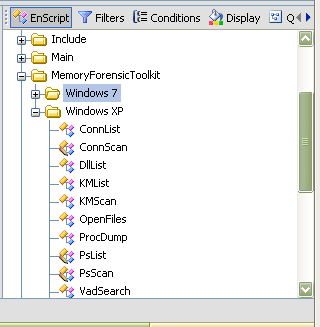
I have only tested the XP scripts at this time. EnScripts available:
- PsList: List of all processes
- KMList: Show all loaded kernel modules
- ConnList: View all TCP connections
- VadSearch: VAD process in the search for a string
- DllList: List Dlls
- OpenFiles: List of open files that the process
- ProcDump: Extracting of a process to exe format
- PsScan: Enumerates process information (EPROCESS)
- ConnScan: Enumerates TCP connection information (TCPT_OBJECT)
- KMScan: Enumerates kernel modules (LDR_MODULE)
- Vtypes/Win32/x86: library to use the above scripts
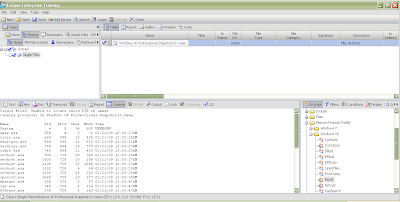
You can run these EnScripts on raw memory dumps, just make sure to check the blue box for the memory dump you would like to run the EnScript against. Just double click the script you'd like to run.
Here's an example run of PsList:
And ConnScan:
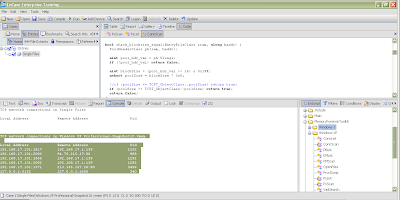
The output is very similar to Volatility and goes to the console by default. You can easily modify the script to output to a text file, Excel spreadsheet or any other output type you can think about, however.
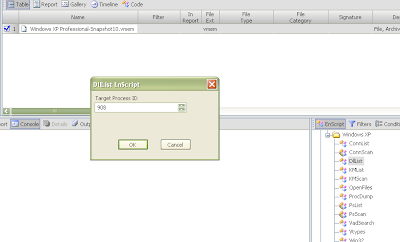
For some EnScripts like dlllist, you are prompted for a PID to run it against. You can modify the script to run agains all PIDs however, if desired.
There is also a Microsoft Crash Analyzer which I have yet to try.
Prerequisite: EnCase 6.14 or higher.
Simply download the toolkit from the link above and unzip it into your EnCaseX.X.X\EnScripts folder. You should see something like the following in your EnScript pane with a Windows 7 folder and Windows XP:

I have only tested the XP scripts at this time. EnScripts available:
- PsList: List of all processes
- KMList: Show all loaded kernel modules
- ConnList: View all TCP connections
- VadSearch: VAD process in the search for a string
- DllList: List Dlls
- OpenFiles: List of open files that the process
- ProcDump: Extracting of a process to exe format
- PsScan: Enumerates process information (EPROCESS)
- ConnScan: Enumerates TCP connection information (TCPT_OBJECT)
- KMScan: Enumerates kernel modules (LDR_MODULE)
- Vtypes/Win32/x86: library to use the above scripts
You can run these EnScripts on raw memory dumps, just make sure to check the blue box for the memory dump you would like to run the EnScript against. Just double click the script you'd like to run.
Here's an example run of PsList:

And ConnScan:

The output is very similar to Volatility and goes to the console by default. You can easily modify the script to output to a text file, Excel spreadsheet or any other output type you can think about, however.
For some EnScripts like dlllist, you are prompted for a PID to run it against. You can modify the script to run agains all PIDs however, if desired.

There is also a Microsoft Crash Analyzer which I have yet to try.
Monday, January 11, 2010
Volatility's Output Rendering Functions
Lately I've been playing around writing plugins for Volatility. A few of these will will be released at the end of this blog post, some others are still in the works to be released later. During the writing of some of the more complicated plugins, I decided that I needed to have some temporary storage while doing complex processing. Sure I could dump to a file and process that later, but why not do it within Volatility itself?
SQLite is good for this. There's an option to use an in-memory database (":memory:") that will remain in memory until the process dies. I also started thinking that some people might like to have a SQLite database of all the information they could get from a memory image for various reasons. Hence this is what the first release of plugins is all about.
Luckily Volatility has an option for plugins to have more than one output option. If you look at the code in forensics/commands.py you'll see the following (line numbers not included):
This allows plugins to have more than one output function. For example a plugin might have a render_text function that would print to stdout as usual, a render_html function that prints out in html style, a render_sql function that does some SQL actions etc etc... The framework allows the user to pick which output option s/he wants and the output file on the command line as defined in vutils.py:
Therefore, if there is a plugin that has an html output option, it can be invoked from the command line like so:
Quite cool :-)
Plugin Structure
If you are interested in writing plugins for Volatility, you really should read Andreas Schuster's slides. They go into nice detail on how to write plugins for the framework. Here I will simply give you the gist :-)
The "skeleton" for the plugins is defined in forensics/commands.py. Items of interest include the help() function which is the plugin description you see when you run Volatility with the help option:
Also of interest is the parser() function, which allows the plugin to modify its command line options. There is also the calculate() function, which is where the real work is done. The last item of our interest is the execute() function which allows us to calculate and collect the desired data from the memory image and then output it using the plugin's chosen render_* function.
The plugins I'm releasing now consist of core commands (defined in vmodules.py) that have been converted to this code structure so I could have more than one type of output for each of these commands. The plugins in this package are:
memory_plugins/connections_2.py
memory_plugins/dlllist_2.py
memory_plugins/files_2.py
memory_plugins/modules_2.py
memory_plugins/pslist_2.py
memory_plugins/sockets_2.py
Schema
The schema for these plugins is quite simple and not much different than the original output for these core commands. There is an extra field for the name of the memory image that was analyzed in case someone would like to place information for more than one memory image into a SQLite database. This may change at some point and of course you are free to change it as you like. It's enough for what I needed, however.
connections_2.py
memory_plugins/dlllist_2.py [Edit: 2/16/10 new schema]
memory_plugins/files_2.py
memory_plugins/modules_2.py
memory_plugins/pslist_2.py
memory_plugins/sockets_2.py
Installation
First, make sure you have SQLite3 installed along with support for Python. Now download the Volatility code from the SVN. Download the plugins from here. A listing of the plugins is as follows:
Make a backup of your vutils.py and forensics/commands.py files if you like. I had to make a small modification to both of these files to get the plugins working properly. Then place the tar file into your Volatility directory and type:
Each of the redefined core commands end with "_2" so pslist becomes pslist_2 and connections becomes connections_2 and so on. So if I wanted to dump the output of the connections_2 plugin to a SQLite file I would type the following:
After running all of the new commands to the same SQLite3 file, I can then look at what I have stored:
You can make as many complex queries as you like now :-)
SQLite is good for this. There's an option to use an in-memory database (":memory:") that will remain in memory until the process dies. I also started thinking that some people might like to have a SQLite database of all the information they could get from a memory image for various reasons. Hence this is what the first release of plugins is all about.
Luckily Volatility has an option for plugins to have more than one output option. If you look at the code in forensics/commands.py you'll see the following (line numbers not included):
82   function_name = "render_%s" % self.opts.output
83   if not self.opts.out_file:
84       outfd = sys.stdout
85   else:
86       outfd = open(self.opts.out_file,'w')
This allows plugins to have more than one output function. For example a plugin might have a render_text function that would print to stdout as usual, a render_html function that prints out in html style, a render_sql function that does some SQL actions etc etc... The framework allows the user to pick which output option s/he wants and the output file on the command line as defined in vutils.py:
45 def get_standard_parser(cmdname):
...
...
59   op.add_option('-H','--output',default = 'text',
60        help='(optional, default="text") Output format (xml, html, sql)')
61   op.add_option('-O', '--out_file', default=None,
62        help='(output filename to write results onto - default stdout)')
Therefore, if there is a plugin that has an html output option, it can be invoked from the command line like so:
./volatility <plugin> -H html -O <out_file> -f mem.dd
Quite cool :-)
Plugin Structure
If you are interested in writing plugins for Volatility, you really should read Andreas Schuster's slides. They go into nice detail on how to write plugins for the framework. Here I will simply give you the gist :-)
The "skeleton" for the plugins is defined in forensics/commands.py. Items of interest include the help() function which is the plugin description you see when you run Volatility with the help option:
./volatility -h
Also of interest is the parser() function, which allows the plugin to modify its command line options. There is also the calculate() function, which is where the real work is done. The last item of our interest is the execute() function which allows us to calculate and collect the desired data from the memory image and then output it using the plugin's chosen render_* function.
The plugins I'm releasing now consist of core commands (defined in vmodules.py) that have been converted to this code structure so I could have more than one type of output for each of these commands. The plugins in this package are:
memory_plugins/connections_2.py
memory_plugins/dlllist_2.py
memory_plugins/files_2.py
memory_plugins/modules_2.py
memory_plugins/pslist_2.py
memory_plugins/sockets_2.py
Schema
The schema for these plugins is quite simple and not much different than the original output for these core commands. There is an extra field for the name of the memory image that was analyzed in case someone would like to place information for more than one memory image into a SQLite database. This may change at some point and of course you are free to change it as you like. It's enough for what I needed, however.
connections_2.py
Table Name:  connections

pid       Process ID
local     Local connection information
remote    Remote connection information
memimage  Memory image information was extracted from
memory_plugins/dlllist_2.py [Edit: 2/16/10 new schema]
Table Name:  dlls

image_file_name  Process name
pid             Process ID
cmdline         Command Line text
base            Base Address
size            Size
path            Path of DLL
memimage  Memory image information was extracted from
memory_plugins/files_2.py
Table Name:  files

pid       Process ID
file      Open file
num       Number of times file is open by pid
memimage  Memory image information was extracted from
memory_plugins/modules_2.py
Table Name:  modules

file      Module Path
base      Base Address
size      Size
name      Module Name
memimage  Memory image information was extracted from
memory_plugins/pslist_2.py
Table Name:  process

pname     Process Name
pid       Process ID
ppid      Parent Process ID
thrds     Threads
hndl      Handle Count
ctime     Creation Time
memimage  Memory image information was extracted from
memory_plugins/sockets_2.py
Table Name:  sockets

pid       Process ID
port      Port
proto     Protocol
ctime     Creation Time
memimage  Memory image information was extracted from
Installation
First, make sure you have SQLite3 installed along with support for Python. Now download the Volatility code from the SVN. Download the plugins from here. A listing of the plugins is as follows:
$ tar -tzf vol_sql.tgz
vutils.py
forensics/commands.py
memory_plugins/connections_2.py
memory_plugins/dlllist_2.py
memory_plugins/files_2.py
memory_plugins/modules_2.py
memory_plugins/pslist_2.py
memory_plugins/sockets_2.py
Make a backup of your vutils.py and forensics/commands.py files if you like. I had to make a small modification to both of these files to get the plugins working properly. Then place the tar file into your Volatility directory and type:
$ tar -xvzf vol_sql.tgz
Each of the redefined core commands end with "_2" so pslist becomes pslist_2 and connections becomes connections_2 and so on. So if I wanted to dump the output of the connections_2 plugin to a SQLite file I would type the following:
./volatility connections_2 -H sql -O test.db -f mem.dd
After running all of the new commands to the same SQLite3 file, I can then look at what I have stored:
$ sqlite3 test.db
SQLite version 3.5.9
Enter ".help" for instructions
sqlite> .table
connections dlls files modules process sockets
sqlite> .schema
CREATE TABLE connections (pid integer, local text, remote text, memimage text);
CREATE TABLE dlls (image_file_name text, pid integer, cmdline text, base text, size text, path text, memimage text);
CREATE TABLE files (pid, file, num, memimage);
CREATE TABLE modules (file text, base text, size text, name text, memimage text);
CREATE TABLE process (pname text, pid integer, ppid integer, thrds text, hndl text, ctime text, memimage text);
CREATE TABLE sockets (pid integer, port integer, proto text, ctime text, memimage text);
sqlite> select * from files where pid = 4 and file like '%SEC%';
4|\WINDOWS\system32\config\SECURITY|1|/home/levy/forensic/evidence/10.vmem
4|\WINDOWS\system32\config\SECURITY.LOG|1|/home/levy/forensic/evidence/10.vmem
sqlite> .quit
You can make as many complex queries as you like now :-)
Saturday, January 02, 2010
Briefly: Misc News
Into the Boxes Issue 0x0 is now out. It contains a small article on Linux memory forensics I wrote as well as a cool article on Windows 7 UserAssist Registry Keys by Didier Stevens, a hardware quick tip and FTK imager quick tip by Don C. Weber and a PCI interview with Harlan Carvey. For those who are interested in contributing to future publications, check out the Collaboration Box. Congratulations to Don and Harlan on the first release!
There is a new meetup group that I am helping to organize: NYC4Sec. The group consists of computer security, forensics and compliance professionals based in the Tri-State area and we will be meeting to discuss the latest trends in threats and responses as well as what to do when attacked. We are aiming to meet at the end of the month. Feel free to sign up and come to the meeting. If anyone is interested in presenting at the meeting, please contact myself or Morton Swimmer.
I have also been asked to give a talk at CEIC 2010. So if you are planning to attend, I'll see you there :-)
There is a new meetup group that I am helping to organize: NYC4Sec. The group consists of computer security, forensics and compliance professionals based in the Tri-State area and we will be meeting to discuss the latest trends in threats and responses as well as what to do when attacked. We are aiming to meet at the end of the month. Feel free to sign up and come to the meeting. If anyone is interested in presenting at the meeting, please contact myself or Morton Swimmer.
I have also been asked to give a talk at CEIC 2010. So if you are planning to attend, I'll see you there :-)
Sunday, December 20, 2009
Linux Memory Forensics: task_struct
A while back, I started blogging about /dev/kcore and had gotten up to the task_struct structure, promising to continue talking about it. Well, it's been a while since, but I have not forgotten. This will take more than one post to finish it up, however. Today we will start with a brief introduction. Later posts will continue our exploration concluding with some small real demonstrations.
task_struct
So what is the task_struct structure? It's a structure that contains information about what a process is doing. It allows the kernel to keep track of processes that are running, the states they are in as well as other information needed by that process during execution.
States of the process are also defined in include/linux/sched.h and let the kernel know if the process is running (TASK_RUNNING), interruptible (TASK_INTERRUPTIBLE), uninterruptible (TASK_UNINTERRUPTIBLE), stopped (TASK_STOPPED), being traced by a debugger (TASK_TRACED), or exiting (EXIT_ZOMBIE, EXIT_DEAD).
The task_struct structure also contains identifying information such as the process PID, thread group leader ID. There are also pointers to the parent process' task_struct structure and real_parent task_struct structure for debugging purposes.
Also contained in the task_struct structure is information about other relationships the current process has such as children or siblings.
The executable name excluding the path is also stored in task_struct as well as current directory information and file descriptors.
The signal_struct structure contains information regarding signals for this process as well as tty associated with it.
Also contained in the task_struct is the mm_struct which contains pointers to vm_area_structs which are areas of virtual memory. We will discuss mm_struct and vm_area_struct next time.
References:
Bovet, D., M. Cesati (2000). Understanding the linux kernel. Cambridge: O'Reilly Media.
Rusling, D. Virtual Memory, The Linux Tutorial http://www.linux-tutorial.info/modules.php?name=MContent&pageid=322
task_struct
So what is the task_struct structure? It's a structure that contains information about what a process is doing. It allows the kernel to keep track of processes that are running, the states they are in as well as other information needed by that process during execution.
States of the process are also defined in include/linux/sched.h and let the kernel know if the process is running (TASK_RUNNING), interruptible (TASK_INTERRUPTIBLE), uninterruptible (TASK_UNINTERRUPTIBLE), stopped (TASK_STOPPED), being traced by a debugger (TASK_TRACED), or exiting (EXIT_ZOMBIE, EXIT_DEAD).
The task_struct structure also contains identifying information such as the process PID, thread group leader ID. There are also pointers to the parent process' task_struct structure and real_parent task_struct structure for debugging purposes.
Also contained in the task_struct structure is information about other relationships the current process has such as children or siblings.
The executable name excluding the path is also stored in task_struct as well as current directory information and file descriptors.
The signal_struct structure contains information regarding signals for this process as well as tty associated with it.
Also contained in the task_struct is the mm_struct which contains pointers to vm_area_structs which are areas of virtual memory. We will discuss mm_struct and vm_area_struct next time.
References:
Bovet, D., M. Cesati (2000). Understanding the linux kernel. Cambridge: O'Reilly Media.
Rusling, D. Virtual Memory, The Linux Tutorial http://www.linux-tutorial.info/modules.php?name=MContent&pageid=322
Subscribe to:
Posts (Atom)