There have been some interesting items in the last week:
Brian Carrier has started a new Open Source Digital Forensics website. It offers a quick way for people to find useful tools, papers and procedures.
Dave Kovar released a new version of analyzeMFT. Not sure how he's had time to work on this, what with his busy glob-trotting lifestyle, but he's done it again :-)
Lance Mueller blogged recently about an EnScript that uses MSSQL for faster filtering of files by hash values. It was provided by Oliver Höpli.
For the iPhone forensics peeps, an iPhone Forensics White Paper was released on viaForensics.
There was also an open source iPhone Analyser released on Sourceforge.
Thursday, November 18, 2010

Wednesday, November 17, 2010
NYC4SEC Meeting 11/17/2010
There is a NYC4SEC meeting tonight (11/17/2010). This month our speaker is Professor Nasir Memon who will be giving a presentation on digital image forensics. Description below:
Don't forget to RSVP!!!
Thanks to Douglas Brush, Joe Garcia, Prof Bilal Khan and Prof Douglas Salane for making this possible.
Photo Forensics: There is More to a Picture Than Meets the Eye
When presented with a device full of active or deleted data – what do you know about the images? Can you recover them all? Can you tell which camera they are taken with? Can you tell if they are manipulated? Can you find from the Internet all other pictures taken from the same camera? Forensics professionals all over the world are increasingly encountering such questions.
Given the ease by which digital images can be created, altered, and manipulated with no obvious traces, digital image forensics has emerged as a research field with important implications for ensuring digital image credibility. This presentation provides an overview of recent developments in the field, focusing on three problems.
First, collecting image evidence and reconstructing them from fragments, with or without missing pieces. This involves sophisticated file carving technology.
Second, attributing the image to a source, be it a camera, a scanner, or a graphically generated picture. The process entails associating the image with a class of sources with common characteristics (device model) or matching the image to an individual source device, for example a specific camera.
Third, attesting to the integrity of image data. This involves image forgery detection to determine whether an image has undergone modification or processing after being initially captured.
So please join us on Wednesday, November 17th, 7:00pm at John Jay College.
John Jay College - Forensic Computing Program and the Center for Cybercrime Studies
899 Tenth Avenue - btwn 58th & 59th
Room 610T - 6th Floor
Don't forget to RSVP!!!
Thanks to Douglas Brush, Joe Garcia, Prof Bilal Khan and Prof Douglas Salane for making this possible.
Tuesday, October 19, 2010
Upcoming NYC4SEC Meeting 10/27/2010
We have another NYC4SEC meetup next week on October 27th, 2010 7:00PM:
More details and RSVP here:
NYC4SEC RSVP
Thanks to Douglas Brush, Joe Garcia, Prof Bilal Khan and Prof Douglas Salane for making this possible.
Halloween Edition - Are those knocks on your firewall doors for tricks or treats?
Either way you have to realize one of the largest threats to your environment is the human element and none other than super malware and security forensicator Lenny Zeltser will be giving us a special Halloween talk about how attackers can trick you or the people inside your organization to get access to treats. Ok, no more puns....
John Jay College has reached out and offered to host this and future events for NYC4SEC so lets spread the word and show them that the NYC cyber security community is strong in numbers and appreciate their support!
Lenny Zeltser - "Knock, Knock! How Attackers Use Social Engineering to Bypass Your Defenses"
Why bother breaking down the door if you can simply ask the person inside to let you in? Social engineering works, both during penetration testing and as part of real-world attacks. This talk explores how attackers are using social engineering to compromise defenses. It presents specific and concrete examples of how social engineering techniques succeeded at bypassing corporate security defenses. Lenny Zeltser will review how attackers have bypassed technological controls by making use of social engineering techniques. Attend this engaging talk to improve the relevance of your security awareness training and to adjust your defenses by revisiting your perspective of the threat landscape.
John Jay College - Forensic Computing Program and the Center for Cybercrime Studies
899 Tenth Avenue - btwn 58th & 59th
Room 610T - 6th Floor
More details and RSVP here:
NYC4SEC RSVP
Thanks to Douglas Brush, Joe Garcia, Prof Bilal Khan and Prof Douglas Salane for making this possible.
Monday, August 30, 2010
Upcoming NYC4SEC Meeting 9/16/10
The next NYC4SEC meeting will take place on September 16, 2010 at 7:00PM at Pace University. Details:
Thanks to Douglas Brush and Joe Garcia for arranging this event.
More details can be found here: http://www.nyc4sec.info/calendar/14520625/
Grab your TrapperKeepers (I'm rockin' the red Lambo), your Saved By the Bell book covers and Garbage Pail Kids cards to stick on the inside of your locker because it's back to school time.
Pace University is our gracious host and our speaker will be Ovie Carroll who will be in town teaching a SANS Forensics 408: Computer Forensic Essentials Course here in NYC and offered to stop by after a day of training to meet our group.
If you would like to attend the 408 course Ovie has provided a special offer for a class discount! Use "COINS-OC" to get 10% off and to make sure to get into class! http://www.sans.org/new-york-forensics-2010-cs/description.php?tid=4207
More details to follow on specific room location for the NYC4SEC Meet-up but please get your parents to sign off on your NYC4SEC permission slips for Thursday, September 16th @ 7pm
Thanks to Douglas Brush and Joe Garcia for arranging this event.
More details can be found here: http://www.nyc4sec.info/calendar/14520625/
Saturday, August 14, 2010
Upated Volatility SQLite plugins
I have recently updated the Volatility sqlite3 plugins (for 1.3.2 branch) with some minor changes:
1) Removal of path from image name
2) Lowercase of all processes, dlls, filenames, modules etc
To make things even more interesting, I have converted some of the scanning code to output in sqlite3 as well:
Schema:
So what kinds of queries could we make with the output of these plugins? Here are few brief examples.
Suppose you want to focus on one pid:
etc..
Suppose you want to link up connections output with the process information:
Suppose you have information from more than one image in your database and want to see if there are any dlls/processes/files in one image not represented in the others:
Suppose you don't care about dlls with a certain path, like winsxs for example:
Want to output all files in alphabetical order?
or by PID?
Now that we have sqlite output for some of the scanning plugins we can quickly compare for information missing from regular plugins. Here's an example of pslist vs psscan3 on an image released by Moyix in his post releasing psscan3:
Well, I'm sure you can think up a lot more crazy queries as well...
The older sqlite plugins usage can be found here. The newly converted plugins usage is:
At some point I'll cover output rendering in the 1.4 branch, which is more interesting :-) Until then:
Happy hunting!
1) Removal of path from image name
2) Lowercase of all processes, dlls, filenames, modules etc
To make things even more interesting, I have converted some of the scanning code to output in sqlite3 as well:
tar -cvzf vol_sql-0.3.tgz vol_sql-0.3/
vol_sql-0.3/
vol_sql-0.3/connections_2.py
vol_sql-0.3/connscan2sql.py
vol_sql-0.3/dlllist_2.py
vol_sql-0.3/driverscan2sql.py
vol_sql-0.3/files_2.py
vol_sql-0.3/filescan2sql.py
vol_sql-0.3/getsids.py
vol_sql-0.3/modscan2sql.py
vol_sql-0.3/modules_2.py
vol_sql-0.3/pslist_2.py
vol_sql-0.3/psscan3sql.py
vol_sql-0.3/sockets_2.py
vol_sql-0.3/sockscan2sql.py
Schema:
CREATE TABLE connections (pid integer, local text, remote text, memimage text);
CREATE TABLE connscan2(pid integer, local text, remote text, memimage text);
CREATE TABLE dlls (pname text, pid integer, cmdline text, base text, size text, path text, memimage text);
CREATE TABLE driverscan2(paddr text, objtype text, pointers integer, handles integer, start text, size text, srvckey text, driver text, path text, memimage text);
CREATE TABLE files (pid integer, file text, num integer, memimage text);
CREATE TABLE filescan2(paddr text, objtype text, pointers integer, handles integer, access text, file text, memimage text);
CREATE TABLE modscan2 (file text, base text, size text, name text, memimage text);
CREATE TABLE modules (file text, base text, size text, name text, memimage text);
CREATE TABLE process (pname text, pid integer, ppid integer, thrds text, hndl text, ctime text, memimage text);
CREATE TABLE psscan3(pid integer, ppid integer, ctime text, etime text, offset text, pdb text, pname text, memimage text);
CREATE TABLE sids (pname text, pid integer, sid_string text, sid_name text, memimage text);
CREATE TABLE sockets (pid integer, port integer, proto text, ctime text, memimage text);
CREATE TABLE sockscan2(pid integer, port integer, proto text, ctime text, offset text, memimage text);
So what kinds of queries could we make with the output of these plugins? Here are few brief examples.
Suppose you want to focus on one pid:
  select * from files where pid = [pid]
  select * from connections where pid = [pid]
etc..
Suppose you want to link up connections output with the process information:
select process.pname, connections.* from connections
   join process where process.pid = connections.pid
      order by connections.pid;
Suppose you have information from more than one image in your database and want to see if there are any dlls/processes/files in one image not represented in the others:
select * from dlls
   where path not in
     (select path from dlls where memimage is not [image name])
Suppose you don't care about dlls with a certain path, like winsxs for example:
select * from dlls
   where path not in
      (select path from dlls
         where memimage is not [image name]) and
           path not like '%winsxs%';
Want to output all files in alphabetical order?
select * from files order by file;
or by PID?
select * from files order by pid;
Now that we have sqlite output for some of the scanning plugins we can quickly compare for information missing from regular plugins. Here's an example of pslist vs psscan3 on an image released by Moyix in his post releasing psscan3:
select psscan3.pid, psscan3.ppid, psscan3.ctime,
 psscan3.pname from psscan3
  where pid not in (select pid from process)
    order by pid;

0|0||idle
592|360|Sat Nov 15 23:42:56 2008|csrss.exe
660|616|Sat Nov 15 23:42:56 2008|services.exe
828|660|Sat Nov 15 23:42:57 2008|svchost.exe
924|660|Sat Nov 15 23:42:57 2008|svchost.exe
992|660|Sat Nov 15 23:43:25 2008|alg.exe
1016|660|Sat Nov 15 23:42:57 2008|svchost.exe
1696|1516|Wed Nov 26 07:43:28 2008|network_listene
Well, I'm sure you can think up a lot more crazy queries as well...
The older sqlite plugins usage can be found here. The newly converted plugins usage is:
./volatility plugin -f [image] -d [sqlite db]
At some point I'll cover output rendering in the 1.4 branch, which is more interesting :-) Until then:
Happy hunting!
Sunday, July 25, 2010
Misc Forensic News
I'm somewhat behind in my blogging... In the past couple of weeks a few things of interest have come out. Here are some highlights:
Moyix released psscan3: a robust process scanner. He also released GDI Utilities for taking screenshots of memory dumps, which is VERY cool! :-)
Lenny Zeltser released REMnux "a lightweight Linux distribution for assisting malware analysts in reverse-engineering malicious software. The distribution is based on Ubuntu" which includes Volatility in its arsenal.
Detective Cindy Murphy published a guide on cell phone examinations, which is definitely worth a read.
There have been some updates to some of the Sysinternals tools that you might want to check out.
F-Reponse now supports Android, which is pretty cool. You can check out their blogpost which includes details and a video.
Into the Boxes is currently looking for collaborators for 0x2. Don't be shy, I know there are a lot of people out who could contribute an article for the next edition. If you have an idea for an article, hit the call box.
Moyix released psscan3: a robust process scanner. He also released GDI Utilities for taking screenshots of memory dumps, which is VERY cool! :-)
Lenny Zeltser released REMnux "a lightweight Linux distribution for assisting malware analysts in reverse-engineering malicious software. The distribution is based on Ubuntu" which includes Volatility in its arsenal.
Detective Cindy Murphy published a guide on cell phone examinations, which is definitely worth a read.
There have been some updates to some of the Sysinternals tools that you might want to check out.
F-Reponse now supports Android, which is pretty cool. You can check out their blogpost which includes details and a video.
Into the Boxes is currently looking for collaborators for 0x2. Don't be shy, I know there are a lot of people out who could contribute an article for the next edition. If you have an idea for an article, hit the call box.
Thursday, July 15, 2010
The Next HOPE and NYC4SEC
We will have another NYC4SEC meetup after Chris Pogue's talk on Sniper Forensics at The Next HOPE. You can RSVP here. Details:
Thanks to Douglas Brush for setting this up ;-)
This is the NYC4SEC after HOPE Meet-up for Sunday, July 18th at 6pm at Stout NYC on 33rd St. (btwn 6th & 7th) – just across the street from the Hotel Pennsylvania.
Informal meet up to hang out and mingle to talk about the highlights of the HOPE conference.
I spoke with Chris Pogue who will be presenting at the conference on Sunday at 4pm - Sniper Forensics - Changing the Landscape of Modern Forensics and Incident Response and he said he will stop by to join us. Checkout Chris’s on his blog: http://thedigitalstandard.blogspot.com/
C’mon by to drink, talk and hang with others in the NYC InFosec community!
Thanks to Douglas Brush for setting this up ;-)
Sunday, July 11, 2010
Moving Forward
A while back I read an article on managing geeks. I think it's fairly accurate and also carries over into the computer forensics arena. If you are in a position of managing geeks and are not one yourself, you might want to read this article.
Thanks to Harlan Carvey I read Lenny Zeltser's presentation on How To Respond To An Unexpected Security Event. That's another good read you shouldn't miss.
Ignoring the problem leads to discontent and inevitably: desertion. Content geeks on the other hand tend to be loyal.

That's about all I'm going to say about that...
Thanks to Harlan Carvey I read Lenny Zeltser's presentation on How To Respond To An Unexpected Security Event. That's another good read you shouldn't miss.
Ignoring the problem leads to discontent and inevitably: desertion. Content geeks on the other hand tend to be loyal.
That's about all I'm going to say about that...
Briefly: Moving of stuff
Since access to my QC website has now expired, I've moved some of the stuff that was linked to there from this blog to here. Future misc scripts will be dumped there as well.
Tuesday, May 25, 2010
Very Briefly: CEIC
Some people have asked me about CEIC. I will not be attending this year unfortunately. I hope those of you who are currently there are having a blast though :-)
Monday, March 15, 2010
Extremely Off Topic - Google: Feeling Lucky?
Just a bit of nonsense I discovered today:

Notice a theme?

Notice a theme?
Sunday, February 14, 2010
GNB's Timeline EnScript
A former colleague of mine, Geoff Black, has a pretty cool timeline EnScript (zip file) available on his website. I have been playing around with it and have meant to blog about it for a while...
The contents of the zip are as follows:
Timeline Report.EnPack
Timeline Report.EnScript (actual code)
Timeline_Report_README.pdf
Timeline_Report_WHATSNEW.pdf
Include\GNB_HTMLlib.EnScript (library file)
Include\GNB_XMLlib.EnScript (library file)
I must say that it's nice that Geoff has given us the code to his Timeline script so that one can modify as desired. It's also nice that he includes README and WHATSNEW files so you can have something to reference for past and present versions.
Simply unzip these items (without the pdfs) into your EnCaseX\EnScript folder and you are ready to go. You can run the script by either double clicking the EnPack or the EnScript, just make sure to add a disk image to the case first ;-). When you run it you will see the following:

There are a lot of options you can choose. Here's a closeup of the interface itself:
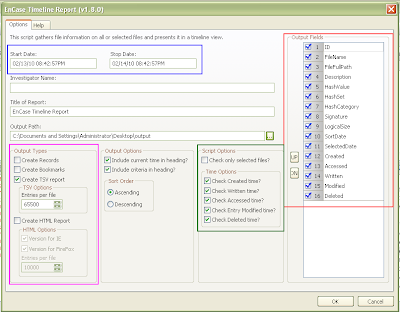
You can pick a certain time period with a start and stop date for the timeline (boxed in blue). You can pick the type of output you want (boxed in pink), whether you want Records, Bookmarks, a Tab Delimited report (TSV), how many entries you'd like in each TSV file and whether or not you would like an HTML report better suited for IE or Firefox. There are more Script Options and Time Options (boxed in green) that allow you to select files you want in the timeline report (default is all files) and which time entries you are interested in seeing (default is all). You can modify the order to the Output Fields (boxed in red) for the TSV file or remove fields that are not of interest. Other fields are self explanatory.
While the script is running you can see the progress bar at the bottom right. If you choose the HTML report option you may end up with several HTML files (depending on how many files are selected and how many entries per file you have selected) and if this is the case each file is named in order for example:
TimelineReport-FF.html
TimelineReport-FF2.html
TimelineReport-FF3.html
and so on... You can see an example report below:

The latest change is highlighted, but you can see that some files might have the same time stamp for different fields. In this case the file will be listed twice, once with Created highlighted and once with Accessed highlighted (from the README).
You can check out some of Geoff's other EnScripts and CEIC presentations at his website: http://www.geoffblack.com/forensics.
The contents of the zip are as follows:
Timeline Report.EnPack
Timeline Report.EnScript (actual code)
Timeline_Report_README.pdf
Timeline_Report_WHATSNEW.pdf
Include\GNB_HTMLlib.EnScript (library file)
Include\GNB_XMLlib.EnScript (library file)
I must say that it's nice that Geoff has given us the code to his Timeline script so that one can modify as desired. It's also nice that he includes README and WHATSNEW files so you can have something to reference for past and present versions.
Simply unzip these items (without the pdfs) into your EnCaseX\EnScript folder and you are ready to go. You can run the script by either double clicking the EnPack or the EnScript, just make sure to add a disk image to the case first ;-). When you run it you will see the following:

There are a lot of options you can choose. Here's a closeup of the interface itself:

You can pick a certain time period with a start and stop date for the timeline (boxed in blue). You can pick the type of output you want (boxed in pink), whether you want Records, Bookmarks, a Tab Delimited report (TSV), how many entries you'd like in each TSV file and whether or not you would like an HTML report better suited for IE or Firefox. There are more Script Options and Time Options (boxed in green) that allow you to select files you want in the timeline report (default is all files) and which time entries you are interested in seeing (default is all). You can modify the order to the Output Fields (boxed in red) for the TSV file or remove fields that are not of interest. Other fields are self explanatory.
While the script is running you can see the progress bar at the bottom right. If you choose the HTML report option you may end up with several HTML files (depending on how many files are selected and how many entries per file you have selected) and if this is the case each file is named in order for example:
TimelineReport-FF.html
TimelineReport-FF2.html
TimelineReport-FF3.html
and so on... You can see an example report below:

The latest change is highlighted, but you can see that some files might have the same time stamp for different fields. In this case the file will be listed twice, once with Created highlighted and once with Accessed highlighted (from the README).
You can check out some of Geoff's other EnScripts and CEIC presentations at his website: http://www.geoffblack.com/forensics.
Yahoo Messenger EnScripts
There are a couple of publicly available Yahoo Messenger EnScripts/EnPacks out, such as:
Yahoo Decoder in unallocated by Lance Mueller
YahooMessenger-Parser by Paul Bobby
Pretty useful scripts, however they don't handle right-to-left languages like Hebrew and Arabic. Here are some before pics from my test run with Hebrew:
Lance Mueller's script's output:

Paul Bobby's scripts' output:

As you can see, (well if you know what Hebrew letters are supposed to look like) the letters come out as some gobbeldy-gook. This is something I've been meaning to comment on for a while, having written various chat EnScripts at the beginning of my GSI employment. I have just gotten around to it now... The "encryption" method is the same for all unicode languages in that it is a byte-by-byte xor with the local username. The problem is that the encoding becomes distorted when it is just saved in a string. For example the letters ש and ל with UTF-8 encodings d7a9 and d79c respectively become c397 and c2a9 (it is left as an exercise for the reader to figure out why). So here comes a solution that I have used in the past.
The EnScripting language has a class called MemoryFileClass, which allows you to have in memory buffers that you can treat as files. You can create them, open them, read and write to them as you would any other file. So the idea is simple enough: write to a memory buffer as you decrypt the message and then extract the message after all decryption has taken place. This is accomplished by adding a couple of helper functions to Paul Bobby's code:
Now we can just call the functions as appropriate when decrypting and outputting the messages. You can see the correct output after this modification below (yeah, the conversation is lame and is just a test ;-):

The complete modified EnScript is available on the GSI forum (registration required):
A thread on the GSI forum with Paul Bobby's fixed EnScript
Yahoo Decoder in unallocated by Lance Mueller
YahooMessenger-Parser by Paul Bobby
Pretty useful scripts, however they don't handle right-to-left languages like Hebrew and Arabic. Here are some before pics from my test run with Hebrew:
Lance Mueller's script's output:

Paul Bobby's scripts' output:

As you can see, (well if you know what Hebrew letters are supposed to look like) the letters come out as some gobbeldy-gook. This is something I've been meaning to comment on for a while, having written various chat EnScripts at the beginning of my GSI employment. I have just gotten around to it now... The "encryption" method is the same for all unicode languages in that it is a byte-by-byte xor with the local username. The problem is that the encoding becomes distorted when it is just saved in a string. For example the letters ש and ל with UTF-8 encodings d7a9 and d79c respectively become c397 and c2a9 (it is left as an exercise for the reader to figure out why). So here comes a solution that I have used in the past.
The EnScripting language has a class called MemoryFileClass, which allows you to have in memory buffers that you can treat as files. You can create them, open them, read and write to them as you would any other file. So the idea is simple enough: write to a memory buffer as you decrypt the message and then extract the message after all decryption has taken place. This is accomplished by adding a couple of helper functions to Paul Bobby's code:
bool WriteBuffer(MemoryFileClass &file, char msg) {
  file.SetCodePage(CodePageClass::ANSI);
  int temp = msg;
  file.WriteBinaryInt(temp, 1);
  return file.IsValid();
}

void ReadBuffer(MemoryFileClass &file, String &msg) {
  file.SetCodePage(CodePageClass::UTF8);
  file.Seek(0);
  file.ReadString(msg);
}
Now we can just call the functions as appropriate when decrypting and outputting the messages. You can see the correct output after this modification below (yeah, the conversation is lame and is just a test ;-):

The complete modified EnScript is available on the GSI forum (registration required):
A thread on the GSI forum with Paul Bobby's fixed EnScript
Briefly: Volatility News (2/14)
I'm a little behind in my blogging, but I wanted to post about a few items that people might not have noticed. So here it is just in time for Valentines Day.
Volatility SQL Plugins
I modified the Volatility SQL output plugins (download link) slightly. I changed the schema in the dlllist_2.py plugin:
memory_plugins/dlllist_2.py
I also removed the Volatility files (vutils.py and commands.py) since there were two patches that address the items I changed in those files. So now all you have to do is download Volatility from the SVN and unzip the plugins like before.
For the more adventurous, the SQL rendering plugins have been incorporated into the experimental branch of Volatility (thank you Scudette!). You can download all branches with the following command:
For the experimental branch (located in the experimental folder) you must have Python 2.6 installed.
Volatility User Manual
There is a new Volatility User Manual contributed to the VDP by Mark Morgan. It is a compilation of past VDP articles and blogposts and covers all public plugins to date. Shouts to Mark!
EnCase Enscripts + Volatility = Takahiro Haruyama's Memory Forensics Toolkit
Takahiro Haruyama has released a new version of his Memory Forensics Toolkit. I had played around with his previous version. Now there is no excuse for the EnCase reliant not to get in on memory forensics ;-) Shouts to Takahiro for making it easier for these users!
Volatility SQL Plugins
I modified the Volatility SQL output plugins (download link) slightly. I changed the schema in the dlllist_2.py plugin:
memory_plugins/dlllist_2.py
Table Name:  dlls

pname           Process name (changed)
pid             Process ID
cmdline         Command Line text
base            Base Address
size            Size
path            Path of DLL
memimage  Memory image information was extracted from
I also removed the Volatility files (vutils.py and commands.py) since there were two patches that address the items I changed in those files. So now all you have to do is download Volatility from the SVN and unzip the plugins like before.
For the more adventurous, the SQL rendering plugins have been incorporated into the experimental branch of Volatility (thank you Scudette!). You can download all branches with the following command:
svn checkout http://volatility.googlecode.com/svn/branches Vol_All
For the experimental branch (located in the experimental folder) you must have Python 2.6 installed.
Volatility User Manual
There is a new Volatility User Manual contributed to the VDP by Mark Morgan. It is a compilation of past VDP articles and blogposts and covers all public plugins to date. Shouts to Mark!
EnCase Enscripts + Volatility = Takahiro Haruyama's Memory Forensics Toolkit
Takahiro Haruyama has released a new version of his Memory Forensics Toolkit. I had played around with his previous version. Now there is no excuse for the EnCase reliant not to get in on memory forensics ;-) Shouts to Takahiro for making it easier for these users!
Sunday, February 07, 2010
Briefly: Memory Analysis EnScripts
I came across a post for the Memory Forensic Toolkit EnScript in the GSI Forum a few days ago. I finally got a chance to play around with it a little today and this will be a very brief overview.
Prerequisite: EnCase 6.14 or higher.
Simply download the toolkit from the link above and unzip it into your EnCaseX.X.X\EnScripts folder. You should see something like the following in your EnScript pane with a Windows 7 folder and Windows XP:
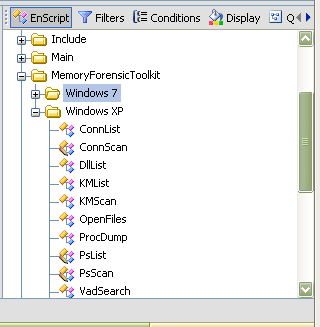
I have only tested the XP scripts at this time. EnScripts available:
- PsList: List of all processes
- KMList: Show all loaded kernel modules
- ConnList: View all TCP connections
- VadSearch: VAD process in the search for a string
- DllList: List Dlls
- OpenFiles: List of open files that the process
- ProcDump: Extracting of a process to exe format
- PsScan: Enumerates process information (EPROCESS)
- ConnScan: Enumerates TCP connection information (TCPT_OBJECT)
- KMScan: Enumerates kernel modules (LDR_MODULE)
- Vtypes/Win32/x86: library to use the above scripts
You can run these EnScripts on raw memory dumps, just make sure to check the blue box for the memory dump you would like to run the EnScript against. Just double click the script you'd like to run.
Here's an example run of PsList:
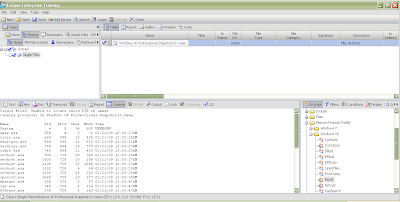
And ConnScan:
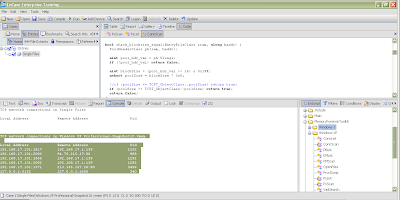
The output is very similar to Volatility and goes to the console by default. You can easily modify the script to output to a text file, Excel spreadsheet or any other output type you can think about, however.
For some EnScripts like dlllist, you are prompted for a PID to run it against. You can modify the script to run agains all PIDs however, if desired.
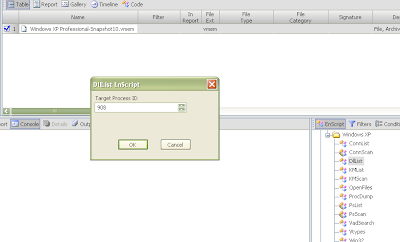
There is also a Microsoft Crash Analyzer which I have yet to try.
Prerequisite: EnCase 6.14 or higher.
Simply download the toolkit from the link above and unzip it into your EnCaseX.X.X\EnScripts folder. You should see something like the following in your EnScript pane with a Windows 7 folder and Windows XP:

I have only tested the XP scripts at this time. EnScripts available:
- PsList: List of all processes
- KMList: Show all loaded kernel modules
- ConnList: View all TCP connections
- VadSearch: VAD process in the search for a string
- DllList: List Dlls
- OpenFiles: List of open files that the process
- ProcDump: Extracting of a process to exe format
- PsScan: Enumerates process information (EPROCESS)
- ConnScan: Enumerates TCP connection information (TCPT_OBJECT)
- KMScan: Enumerates kernel modules (LDR_MODULE)
- Vtypes/Win32/x86: library to use the above scripts
You can run these EnScripts on raw memory dumps, just make sure to check the blue box for the memory dump you would like to run the EnScript against. Just double click the script you'd like to run.
Here's an example run of PsList:

And ConnScan:

The output is very similar to Volatility and goes to the console by default. You can easily modify the script to output to a text file, Excel spreadsheet or any other output type you can think about, however.
For some EnScripts like dlllist, you are prompted for a PID to run it against. You can modify the script to run agains all PIDs however, if desired.

There is also a Microsoft Crash Analyzer which I have yet to try.
Forensic Regexes
The other day on the #volatility channel we were discussing how it might be nice to have a list of Perl Regex for common things like IP addresses etc. Here are a few items we came up with:
IP Address: (?:(?:25[0-5]|2[0-4][0-9]|[01]?[0-9][0-9]?)\.){3}(?:25[0-5]|2[0-4][0-9]|[01]?[0-9][0-9]?)
MAC Address: ([a-fA-F0-9]{2}\:){5}[a-fA-F0-9]{2}
URL: (http|https|ftp|mail)\:[\/\w.]+
Email: [A-Za-z0-9._%+-]+@[A-Za-z0-9.-]+\.[A-Za-z]{2,4}
You can find some other Regex expressions on the SANS blog however the regex expression for IP addresses matches items like 999.999.999.999, which we know is not a valid IP address.
There's a nice post by geek00l listed at the bottom of the SANS post which links to other interesting posts.
Other references of interest:
Regular-Expressions.info
Regex Reference
What would you like to add to the list?
IP Address: (?:(?:25[0-5]|2[0-4][0-9]|[01]?[0-9][0-9]?)\.){3}(?:25[0-5]|2[0-4][0-9]|[01]?[0-9][0-9]?)
MAC Address: ([a-fA-F0-9]{2}\:){5}[a-fA-F0-9]{2}
URL: (http|https|ftp|mail)\:[\/\w.]+
Email: [A-Za-z0-9._%+-]+@[A-Za-z0-9.-]+\.[A-Za-z]{2,4}
You can find some other Regex expressions on the SANS blog however the regex expression for IP addresses matches items like 999.999.999.999, which we know is not a valid IP address.
There's a nice post by geek00l listed at the bottom of the SANS post which links to other interesting posts.
Other references of interest:
Regular-Expressions.info
Regex Reference
What would you like to add to the list?
Thursday, January 28, 2010
Cybercrime Studies: File Carving for Forensics Recovery
There is an upcoming talk at John Jay College that should be interesting:
File Carving for Forensics Recovery
Nasir Memon
Professor of Computer Science
Director of the Information Systems and Internet Security (ISIS) Lab
Polytechnic Institute of New York University
As the number of digital devices in use continues to increase, there has also been an increase in the seizure and analysis of digital data for forensic purposes. One of the areas of high forensic interest is in the recovery of digital data from devices. In cases where the file system information for a digital device is missing or corrupt, newer data recovery techniques involving a process known as file carving are used to recover the data. This talk describes the need for and evolution of file carving, and presents the various technologies that have been used to improve file carving recovery, including our own Smart Carving techniques.
RSVP: Nicole Daniels at 212-237-8920 or email ndaniels@jjay.cuny.edu.
For additional information please contact Professor Doug Salane, Director of the Center for Cybercrime Studies, at 212-237-8836 or email dsalane@jjay.cuny.edu.
File Carving for Forensics Recovery
Nasir Memon
Professor of Computer Science
Director of the Information Systems and Internet Security (ISIS) Lab
Polytechnic Institute of New York University
As the number of digital devices in use continues to increase, there has also been an increase in the seizure and analysis of digital data for forensic purposes. One of the areas of high forensic interest is in the recovery of digital data from devices. In cases where the file system information for a digital device is missing or corrupt, newer data recovery techniques involving a process known as file carving are used to recover the data. This talk describes the need for and evolution of file carving, and presents the various technologies that have been used to improve file carving recovery, including our own Smart Carving techniques.
Date:       Tuesday, February 9, 2010
Time:       Reception – 1:45pm, Lecture – 2:00 pm
Location:   Room 630T, Haaren Hall
            899 Tenth Avenue, New York City 10019
RSVP: Nicole Daniels at 212-237-8920 or email ndaniels@jjay.cuny.edu.
For additional information please contact Professor Doug Salane, Director of the Center for Cybercrime Studies, at 212-237-8836 or email dsalane@jjay.cuny.edu.
Monday, January 11, 2010
Volatility's Output Rendering Functions
Lately I've been playing around writing plugins for Volatility. A few of these will will be released at the end of this blog post, some others are still in the works to be released later. During the writing of some of the more complicated plugins, I decided that I needed to have some temporary storage while doing complex processing. Sure I could dump to a file and process that later, but why not do it within Volatility itself?
SQLite is good for this. There's an option to use an in-memory database (":memory:") that will remain in memory until the process dies. I also started thinking that some people might like to have a SQLite database of all the information they could get from a memory image for various reasons. Hence this is what the first release of plugins is all about.
Luckily Volatility has an option for plugins to have more than one output option. If you look at the code in forensics/commands.py you'll see the following (line numbers not included):
This allows plugins to have more than one output function. For example a plugin might have a render_text function that would print to stdout as usual, a render_html function that prints out in html style, a render_sql function that does some SQL actions etc etc... The framework allows the user to pick which output option s/he wants and the output file on the command line as defined in vutils.py:
Therefore, if there is a plugin that has an html output option, it can be invoked from the command line like so:
Quite cool :-)
Plugin Structure
If you are interested in writing plugins for Volatility, you really should read Andreas Schuster's slides. They go into nice detail on how to write plugins for the framework. Here I will simply give you the gist :-)
The "skeleton" for the plugins is defined in forensics/commands.py. Items of interest include the help() function which is the plugin description you see when you run Volatility with the help option:
Also of interest is the parser() function, which allows the plugin to modify its command line options. There is also the calculate() function, which is where the real work is done. The last item of our interest is the execute() function which allows us to calculate and collect the desired data from the memory image and then output it using the plugin's chosen render_* function.
The plugins I'm releasing now consist of core commands (defined in vmodules.py) that have been converted to this code structure so I could have more than one type of output for each of these commands. The plugins in this package are:
memory_plugins/connections_2.py
memory_plugins/dlllist_2.py
memory_plugins/files_2.py
memory_plugins/modules_2.py
memory_plugins/pslist_2.py
memory_plugins/sockets_2.py
Schema
The schema for these plugins is quite simple and not much different than the original output for these core commands. There is an extra field for the name of the memory image that was analyzed in case someone would like to place information for more than one memory image into a SQLite database. This may change at some point and of course you are free to change it as you like. It's enough for what I needed, however.
connections_2.py
memory_plugins/dlllist_2.py [Edit: 2/16/10 new schema]
memory_plugins/files_2.py
memory_plugins/modules_2.py
memory_plugins/pslist_2.py
memory_plugins/sockets_2.py
Installation
First, make sure you have SQLite3 installed along with support for Python. Now download the Volatility code from the SVN. Download the plugins from here. A listing of the plugins is as follows:
Make a backup of your vutils.py and forensics/commands.py files if you like. I had to make a small modification to both of these files to get the plugins working properly. Then place the tar file into your Volatility directory and type:
Each of the redefined core commands end with "_2" so pslist becomes pslist_2 and connections becomes connections_2 and so on. So if I wanted to dump the output of the connections_2 plugin to a SQLite file I would type the following:
After running all of the new commands to the same SQLite3 file, I can then look at what I have stored:
You can make as many complex queries as you like now :-)
SQLite is good for this. There's an option to use an in-memory database (":memory:") that will remain in memory until the process dies. I also started thinking that some people might like to have a SQLite database of all the information they could get from a memory image for various reasons. Hence this is what the first release of plugins is all about.
Luckily Volatility has an option for plugins to have more than one output option. If you look at the code in forensics/commands.py you'll see the following (line numbers not included):
82   function_name = "render_%s" % self.opts.output
83   if not self.opts.out_file:
84       outfd = sys.stdout
85   else:
86       outfd = open(self.opts.out_file,'w')
This allows plugins to have more than one output function. For example a plugin might have a render_text function that would print to stdout as usual, a render_html function that prints out in html style, a render_sql function that does some SQL actions etc etc... The framework allows the user to pick which output option s/he wants and the output file on the command line as defined in vutils.py:
45 def get_standard_parser(cmdname):
...
...
59   op.add_option('-H','--output',default = 'text',
60        help='(optional, default="text") Output format (xml, html, sql)')
61   op.add_option('-O', '--out_file', default=None,
62        help='(output filename to write results onto - default stdout)')
Therefore, if there is a plugin that has an html output option, it can be invoked from the command line like so:
./volatility <plugin> -H html -O <out_file> -f mem.dd
Quite cool :-)
Plugin Structure
If you are interested in writing plugins for Volatility, you really should read Andreas Schuster's slides. They go into nice detail on how to write plugins for the framework. Here I will simply give you the gist :-)
The "skeleton" for the plugins is defined in forensics/commands.py. Items of interest include the help() function which is the plugin description you see when you run Volatility with the help option:
./volatility -h
Also of interest is the parser() function, which allows the plugin to modify its command line options. There is also the calculate() function, which is where the real work is done. The last item of our interest is the execute() function which allows us to calculate and collect the desired data from the memory image and then output it using the plugin's chosen render_* function.
The plugins I'm releasing now consist of core commands (defined in vmodules.py) that have been converted to this code structure so I could have more than one type of output for each of these commands. The plugins in this package are:
memory_plugins/connections_2.py
memory_plugins/dlllist_2.py
memory_plugins/files_2.py
memory_plugins/modules_2.py
memory_plugins/pslist_2.py
memory_plugins/sockets_2.py
Schema
The schema for these plugins is quite simple and not much different than the original output for these core commands. There is an extra field for the name of the memory image that was analyzed in case someone would like to place information for more than one memory image into a SQLite database. This may change at some point and of course you are free to change it as you like. It's enough for what I needed, however.
connections_2.py
Table Name:  connections

pid       Process ID
local     Local connection information
remote    Remote connection information
memimage  Memory image information was extracted from
memory_plugins/dlllist_2.py [Edit: 2/16/10 new schema]
Table Name:  dlls

image_file_name  Process name
pid             Process ID
cmdline         Command Line text
base            Base Address
size            Size
path            Path of DLL
memimage  Memory image information was extracted from
memory_plugins/files_2.py
Table Name:  files

pid       Process ID
file      Open file
num       Number of times file is open by pid
memimage  Memory image information was extracted from
memory_plugins/modules_2.py
Table Name:  modules

file      Module Path
base      Base Address
size      Size
name      Module Name
memimage  Memory image information was extracted from
memory_plugins/pslist_2.py
Table Name:  process

pname     Process Name
pid       Process ID
ppid      Parent Process ID
thrds     Threads
hndl      Handle Count
ctime     Creation Time
memimage  Memory image information was extracted from
memory_plugins/sockets_2.py
Table Name:  sockets

pid       Process ID
port      Port
proto     Protocol
ctime     Creation Time
memimage  Memory image information was extracted from
Installation
First, make sure you have SQLite3 installed along with support for Python. Now download the Volatility code from the SVN. Download the plugins from here. A listing of the plugins is as follows:
$ tar -tzf vol_sql.tgz
vutils.py
forensics/commands.py
memory_plugins/connections_2.py
memory_plugins/dlllist_2.py
memory_plugins/files_2.py
memory_plugins/modules_2.py
memory_plugins/pslist_2.py
memory_plugins/sockets_2.py
Make a backup of your vutils.py and forensics/commands.py files if you like. I had to make a small modification to both of these files to get the plugins working properly. Then place the tar file into your Volatility directory and type:
$ tar -xvzf vol_sql.tgz
Each of the redefined core commands end with "_2" so pslist becomes pslist_2 and connections becomes connections_2 and so on. So if I wanted to dump the output of the connections_2 plugin to a SQLite file I would type the following:
./volatility connections_2 -H sql -O test.db -f mem.dd
After running all of the new commands to the same SQLite3 file, I can then look at what I have stored:
$ sqlite3 test.db
SQLite version 3.5.9
Enter ".help" for instructions
sqlite> .table
connections dlls files modules process sockets
sqlite> .schema
CREATE TABLE connections (pid integer, local text, remote text, memimage text);
CREATE TABLE dlls (image_file_name text, pid integer, cmdline text, base text, size text, path text, memimage text);
CREATE TABLE files (pid, file, num, memimage);
CREATE TABLE modules (file text, base text, size text, name text, memimage text);
CREATE TABLE process (pname text, pid integer, ppid integer, thrds text, hndl text, ctime text, memimage text);
CREATE TABLE sockets (pid integer, port integer, proto text, ctime text, memimage text);
sqlite> select * from files where pid = 4 and file like '%SEC%';
4|\WINDOWS\system32\config\SECURITY|1|/home/levy/forensic/evidence/10.vmem
4|\WINDOWS\system32\config\SECURITY.LOG|1|/home/levy/forensic/evidence/10.vmem
sqlite> .quit
You can make as many complex queries as you like now :-)
Saturday, January 02, 2010
Briefly: Misc News
Into the Boxes Issue 0x0 is now out. It contains a small article on Linux memory forensics I wrote as well as a cool article on Windows 7 UserAssist Registry Keys by Didier Stevens, a hardware quick tip and FTK imager quick tip by Don C. Weber and a PCI interview with Harlan Carvey. For those who are interested in contributing to future publications, check out the Collaboration Box. Congratulations to Don and Harlan on the first release!
There is a new meetup group that I am helping to organize: NYC4Sec. The group consists of computer security, forensics and compliance professionals based in the Tri-State area and we will be meeting to discuss the latest trends in threats and responses as well as what to do when attacked. We are aiming to meet at the end of the month. Feel free to sign up and come to the meeting. If anyone is interested in presenting at the meeting, please contact myself or Morton Swimmer.
I have also been asked to give a talk at CEIC 2010. So if you are planning to attend, I'll see you there :-)
There is a new meetup group that I am helping to organize: NYC4Sec. The group consists of computer security, forensics and compliance professionals based in the Tri-State area and we will be meeting to discuss the latest trends in threats and responses as well as what to do when attacked. We are aiming to meet at the end of the month. Feel free to sign up and come to the meeting. If anyone is interested in presenting at the meeting, please contact myself or Morton Swimmer.
I have also been asked to give a talk at CEIC 2010. So if you are planning to attend, I'll see you there :-)
Sunday, December 20, 2009
Linux Memory Forensics: task_struct
A while back, I started blogging about /dev/kcore and had gotten up to the task_struct structure, promising to continue talking about it. Well, it's been a while since, but I have not forgotten. This will take more than one post to finish it up, however. Today we will start with a brief introduction. Later posts will continue our exploration concluding with some small real demonstrations.
task_struct
So what is the task_struct structure? It's a structure that contains information about what a process is doing. It allows the kernel to keep track of processes that are running, the states they are in as well as other information needed by that process during execution.
States of the process are also defined in include/linux/sched.h and let the kernel know if the process is running (TASK_RUNNING), interruptible (TASK_INTERRUPTIBLE), uninterruptible (TASK_UNINTERRUPTIBLE), stopped (TASK_STOPPED), being traced by a debugger (TASK_TRACED), or exiting (EXIT_ZOMBIE, EXIT_DEAD).
The task_struct structure also contains identifying information such as the process PID, thread group leader ID. There are also pointers to the parent process' task_struct structure and real_parent task_struct structure for debugging purposes.
Also contained in the task_struct structure is information about other relationships the current process has such as children or siblings.
The executable name excluding the path is also stored in task_struct as well as current directory information and file descriptors.
The signal_struct structure contains information regarding signals for this process as well as tty associated with it.
Also contained in the task_struct is the mm_struct which contains pointers to vm_area_structs which are areas of virtual memory. We will discuss mm_struct and vm_area_struct next time.
References:
Bovet, D., M. Cesati (2000). Understanding the linux kernel. Cambridge: O'Reilly Media.
Rusling, D. Virtual Memory, The Linux Tutorial http://www.linux-tutorial.info/modules.php?name=MContent&pageid=322
task_struct
So what is the task_struct structure? It's a structure that contains information about what a process is doing. It allows the kernel to keep track of processes that are running, the states they are in as well as other information needed by that process during execution.
States of the process are also defined in include/linux/sched.h and let the kernel know if the process is running (TASK_RUNNING), interruptible (TASK_INTERRUPTIBLE), uninterruptible (TASK_UNINTERRUPTIBLE), stopped (TASK_STOPPED), being traced by a debugger (TASK_TRACED), or exiting (EXIT_ZOMBIE, EXIT_DEAD).
The task_struct structure also contains identifying information such as the process PID, thread group leader ID. There are also pointers to the parent process' task_struct structure and real_parent task_struct structure for debugging purposes.
Also contained in the task_struct structure is information about other relationships the current process has such as children or siblings.
The executable name excluding the path is also stored in task_struct as well as current directory information and file descriptors.
The signal_struct structure contains information regarding signals for this process as well as tty associated with it.
Also contained in the task_struct is the mm_struct which contains pointers to vm_area_structs which are areas of virtual memory. We will discuss mm_struct and vm_area_struct next time.
References:
Bovet, D., M. Cesati (2000). Understanding the linux kernel. Cambridge: O'Reilly Media.
Rusling, D. Virtual Memory, The Linux Tutorial http://www.linux-tutorial.info/modules.php?name=MContent&pageid=322
Subscribe to:
Posts (Atom)